


.svg)

.png)
Search for "LinkedIn MCP" and you'll find a page full of servers that promise the same thing: connect LinkedIn to Claude or ChatGPT. Open their documentation and they turn out to do very different jobs. Some read other people's profiles. Some post for you. A few read your own content and how it performed.
LinkedIn doesn't publish an official MCP server. Every LinkedIn MCP is third-party, and they differ less in what they promise than in what they do on LinkedIn each time you send a prompt.
That's the test we'd use to pick one. Most guides ask whether a server scrapes. The more useful question is what happens on your account when you type a request.
Then there's the data. How often your post was seen is visible only to you. Everyone else sees reactions, and reactions tell you surprisingly little: in our analysis of 261,377 personal-profile posts, two posts with the same response could differ almost eightfold in impressions.
Below is what exists, what each kind of server can see and risk, how the content tools compare, and how to connect one to Claude or ChatGPT.
Already use AuthoredUp? Jump straight to setup.
Key takeaways
- There is no official LinkedIn MCP server. LinkedIn does have an official API, including an endpoint for your own post analytics.
- LinkedIn MCP servers come in four kinds: session servers, data-extraction platforms, official-API connectors and content-tool servers.
- Session servers drive your logged-in account, and LinkedIn's User Agreement prohibits that kind of automation. That's where the ban risk sits.
- Only a server acting as you, or one holding your data with your permission, can see your reach. Official-API tools see only the posts you publish through them.
- At least seven LinkedIn content tools now run MCP servers. They differ most in how deep the analytics go, how drafts reach LinkedIn, and what else they create.
Does LinkedIn have an official MCP?
No. LinkedIn hasn't released an MCP server, and none of the servers you'll find is run by LinkedIn.
What LinkedIn does have is an official API. Its Community Management API includes a member post analytics endpoint for your own posts, open to apps LinkedIn has approved. It returns the numbers normally only you can see: impressions, members reached, profile views, followers gained, saves, sends and link clicks.
This one surprised us. There's no official MCP, but there is an official way to get your own numbers out.
It has limits, though. An app using the API sees only the posts published through that app, not the rest of your LinkedIn history. And several of those numbers are new to the API: saves, sends, link clicks, followers gained and profile views arrived in 2026, so there's no history behind them. If you want to look back over years of posts, the API alone won't get you there.
The two fit together like a door and a key. The API is the door LinkedIn builds. An MCP server is an adapter that follows the Model Context Protocol, an open standard for letting AI assistants call outside tools, so your assistant can use a door without you writing any code. What matters is whose key it's holding.
The four kinds of LinkedIn MCP server
Every server on the first page of Google falls into one of four groups. We read the documentation and tool list for each server named below in September 2026.
Session servers
The most-starred open-source option, stickerdaniel's linkedin-mcp-server (about 3,400 stars on GitHub), runs a real Chromium browser signed in as you, with the session saved on your computer. Its 19 tools cover profiles, companies, job search, your inbox, sending messages and connection requests, the feed and post search. None of them reads your own post analytics.
Its README is upfront about the risk and says that "accounts using automated tools can be restricted or banned." Each prompt you send becomes page loads, and sometimes actions, from your account.
Data-extraction platforms
Apify and Bright Data run the requests from their own infrastructure, so your account isn't involved. What comes back is other people's data: public profile fields, job history, company details and, in Apify's case, email addresses and phone numbers.
Apify's LinkedIn server doesn't use your cookies, which makes it safer for your account than a session server. The risk moves to the people being looked up. That's a privacy question rather than an account-safety one, and a serious one if you or your prospects are in the EU.
These are prospecting tools, and they're good at prospecting. If that's your job, our roundup of LinkedIn sales tools covers the whole category. What they can't return is anyone's reach, because impressions never appear on a public page.
Official-API connectors
Zapier and Composio connect through LinkedIn's official API with a permission you grant. Zapier's LinkedIn MCP is narrow: it exposes two actions, creating a share update and creating a company update. So it posts, and it doesn't read analytics.
That's Zapier's choice, not a limit of the API. Composio's LinkedIn toolkit, for one, can pull share statistics for company pages, impressions included. Even with the right permission, a connector only sees posts published through it, so your history starts the day you connect. Read a connector's tool list before assuming what it can see.
Content-tool servers
If you already use a LinkedIn tool, this is probably the kind you'll end up with. Taplio, MagicPost, Supergrow, Postiv, ContentIn, Postbeam and AuthoredUp all let your assistant into the account you already have with them. They read posts and performance data the tool already holds for you, and all seven can draft. They differ a lot in what else they do, which gets its own section below.
Is there a Claude MCP for LinkedIn? And for ChatGPT?
Yes, several, though none built by Anthropic or OpenAI. Both assistants let you add a remote MCP server by URL, and both have plan limits you'll hit before anything else.
In Claude, remote servers are called custom connectors. According to Anthropic's documentation, they work on every plan including Free, with Free limited to one custom connector. On Team and Enterprise, only an Owner can add a connector for the organization. A connector added on claude.ai also shows up in Claude Desktop and the mobile apps.
ChatGPT is pickier. According to OpenAI's help page, full access is only on Business, Enterprise and Edu, and an admin has to switch Developer mode on. On Pro you can connect, but only to read: ChatGPT can analyse your posts, it just can't write a draft back. Plus and Free aren't included.
The detail that matters more than the plan is how a server signs you in. We checked the content tools' setup pages in September 2026, and they split in two. Some ask you to generate a key in their app and paste it into your assistant, which works until that key leaks or you forget where you pasted it. Others use OAuth: you sign in, approve access, and can revoke it later without rotating anything.
If you've been pasting posts into a chat with ChatGPT prompts for LinkedIn, a connector is what replaces the pasting.
Can Claude scrape LinkedIn, and will LinkedIn ban you for it?
Claude can't scrape LinkedIn on its own. It can if you connect it to a session server that does, and that's where the ban risk sits.
LinkedIn's User Agreement, section 8.2, prohibits bots and other unauthorized automated methods used to access the site, send messages or drive engagement, and it prohibits scrapers, crawlers and browser add-ons that copy its content. Enforcement also scales with volume. One scraper sold on Apify's own store, which runs on your LinkedIn cookies, warns buyers that viewing or scraping more than 300 to 400 profiles a day will get the account a warning from LinkedIn.
Here's what that difference looks like in practice.
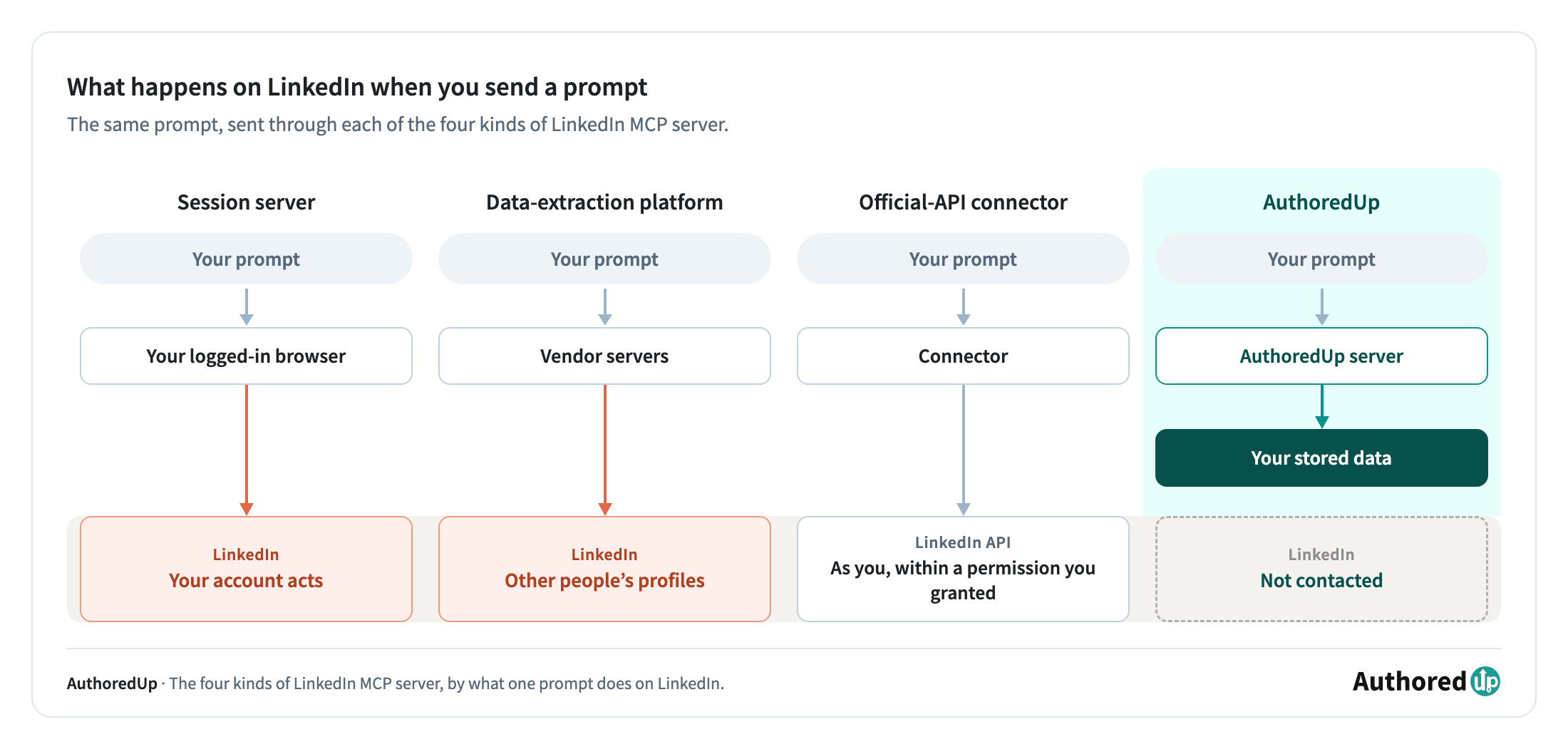
Say you type "show me my last 30 posts". With a session server, a browser logged in as you starts clicking through LinkedIn, at machine speed, under your name. With a data-extraction platform, someone else's servers do the fetching, about someone else. With an API connector, LinkedIn gets a request it approved, from an app you can switch off. With AuthoredUp, LinkedIn doesn't hear about it at all: Claude asks AuthoredUp, and AuthoredUp already has the posts.
We didn't run a session server on a real account while researching this, and that decision is the argument in one line. If we wouldn't risk our own account on it, we won't tell you to risk yours.
"No scraping" on its own tells you less than it sounds. An MCP connector can be completely scrape-free while the product behind it sells automated connection requests or DMs. Judge the connector by what it does on LinkedIn when you send a prompt, and the product by everything else it does. For the wider picture on automation and where LinkedIn draws lines, see our guide to automating LinkedIn posts.
What each kind of server can actually see
The data a server can reach decides what it's good for. If you want an assistant to help with your own content, the numbers you need are mostly ones nobody else can see.
LinkedIn shows everyone a post's text, its reaction count, comments and reposts, and the author's follower count. It shows only the author the impressions, members reached, profile views from the post, followers gained, saves, sends and link clicks. As LinkedIn's own help page puts it, only you can view your post analytics. Our guide to LinkedIn impressions vs views covers what each of those counts.
A server reading public pages gets the first list. It can tell you a post got 40 reactions. It can't tell you whether those 40 came out of 600 impressions or 4,000.
That gap is wider than it looks. We grouped 261,377 posts from personal profiles, published between March and August 2026, by their visible engagement: reactions, comments and reposts added together. Then we looked at how many impressions the posts in each group got.
Take the posts with 25 to 49 visible engagements, the second most common group. The median post had 1,270 impressions. The quietest tenth had 535 or fewer, and the busiest tenth had 4,222 or more. Same response on the surface, almost eight times the impressions underneath.
It isn't a quirk of one group. In every group we can compare fairly, the busiest tenth of posts had roughly 7 to 11 times the impressions of the quietest tenth.
Personal profiles, March–August 2026. We left out the groups our filters cut off or that span too wide a range to compare fairly.
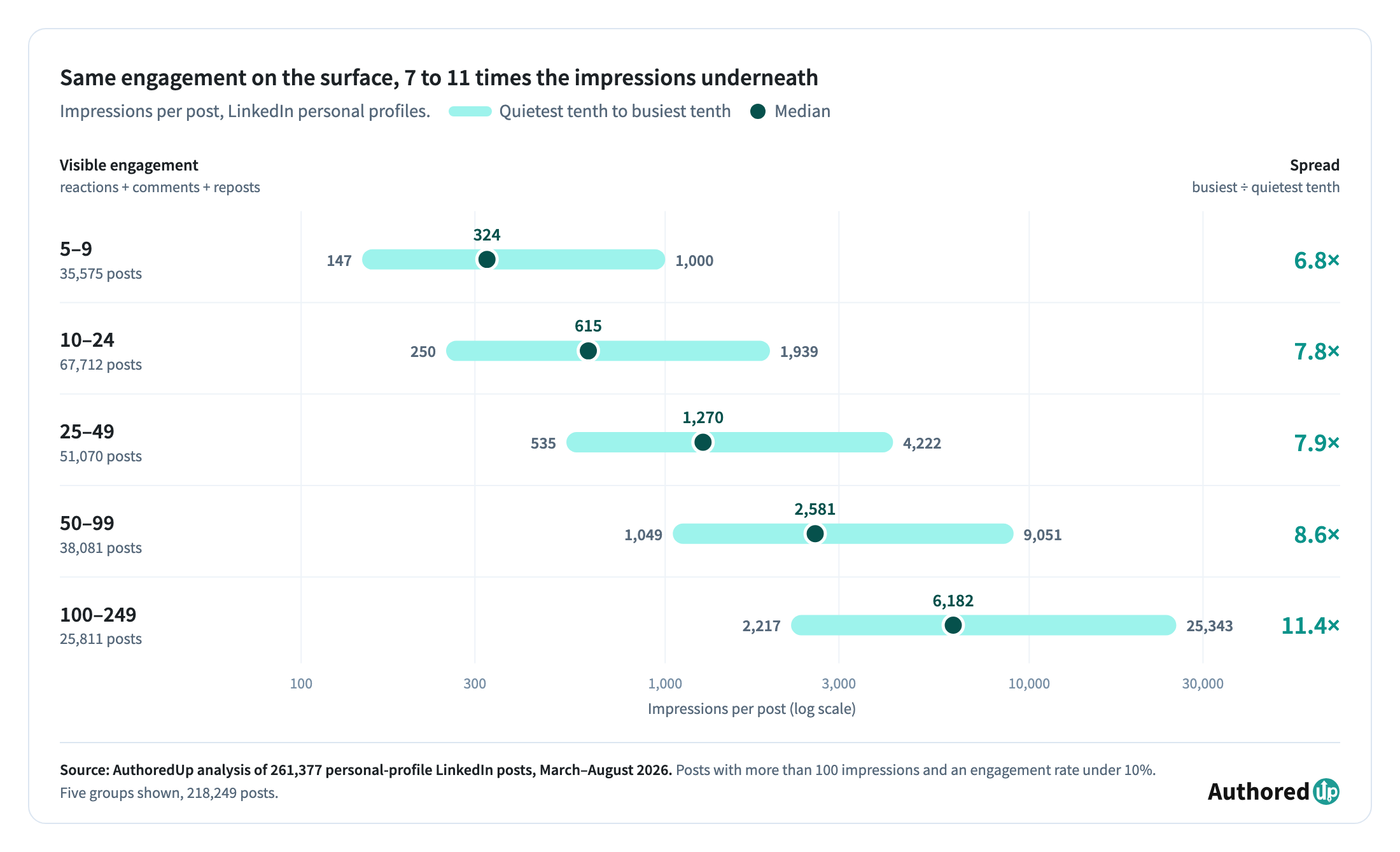
For choosing a server, that means public engagement tells you that people responded. It doesn't tell you how often the post was seen or whether it travelled past your network. To analyse your own content you need a server acting as you through the API, or one that already holds your analytics. Through the API, your history starts the day you connect. A tool that already holds your analytics can go back further.
Engagement rate shows the gap neatly. It's engagements divided by impressions, so without the impressions no server can work it out (how engagement rate is calculated). A scraper can count your reactions all day and still not know your engagement rate.
LinkedIn content tools with MCP servers, compared
At least seven LinkedIn content tools now run MCP servers. We build one of them, AuthoredUp, a LinkedIn content creation and analytics platform, so read the last row knowing that. Every other row comes from the vendor's own published pages, checked in September 2026.
A few things stand out once it's laid out like this.
Start with measurement, because that's where depth varies most. MagicPost returns top-line totals and your best posts. ContentIn goes to per-post figures including members reached. The AuthoredUp connection adds the reaction split by type and text metrics such as length, sentence count and readability, which matter when your question is about the writing rather than the reach. It also keeps the history of your followers and engagement, for your profile and each company page. And because it can hold your imported LinkedIn archive, it looks back years, not just to the day you signed up. Our roundup of LinkedIn analytics tools covers the analytics side without the assistant.
On publishing, six of the seven can post or schedule from inside the chat. MagicPost's documentation points out why that's harder than it looks: by its account, LinkedIn's API has no scheduling endpoint, so a tool that schedules has to hold the post itself and send it at the time you chose. Taplio, Supergrow, ContentIn and Postbeam all wait for your confirmation before anything goes live. AuthoredUp keeps the one step you can't undo with you: the assistant prepares the draft with a planned time and a reminder, and you publish it from AuthoredUp after seeing the preview.
If you create visuals from the chat, Postiv documents image and carousel generation, and Postbeam can attach images to drafts.
Three of them have you paste a key or a URL; four let you sign in and approve. For the rest of the tool category beyond MCP, see our list of LinkedIn tools.
How to connect the AuthoredUp MCP to Claude and ChatGPT
The server URL:
https://backend.authoredup.com/mcp
That's the only thing you type. There's no key to generate: the connection registers itself and signs you in with OAuth. You'll need an AuthoredUp account to approve it, and the connection is included on every plan.
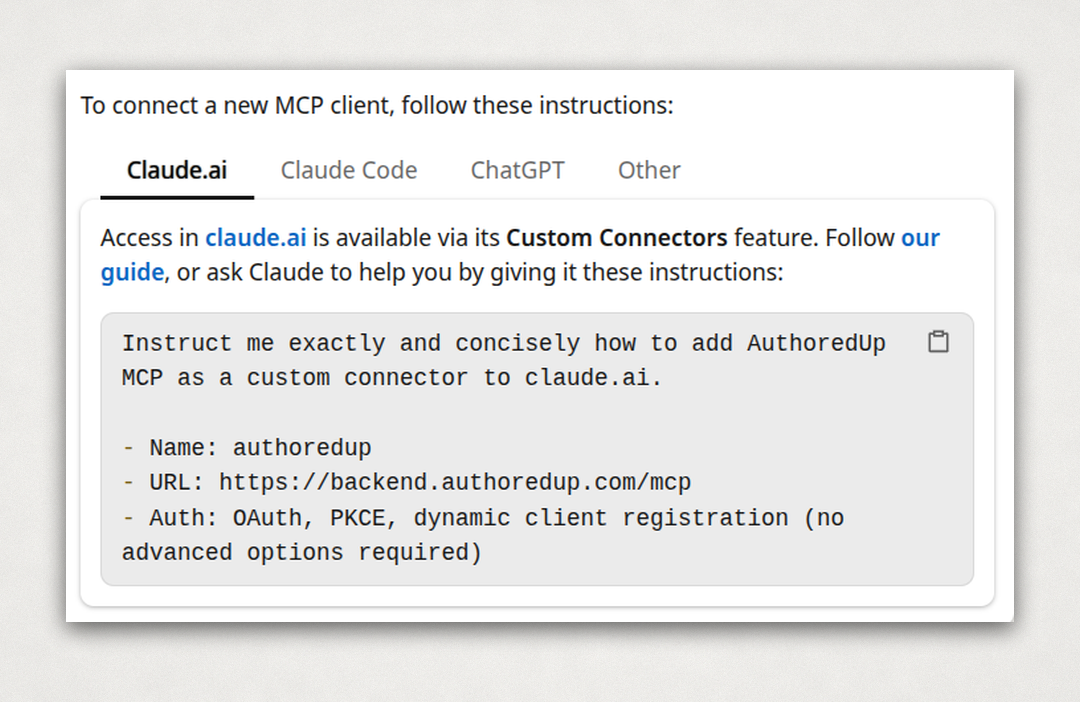
Claude (claude.ai, Desktop and mobile)
- On claude.ai, open Customize > Connectors.
- Click +, then Add custom connector.
- Name it AuthoredUp, paste the server URL and leave the advanced settings empty.
- Click Add, then Connect, and sign in to AuthoredUp in the window that opens.
- Approve access. The connector now works in Claude Desktop and the mobile apps as well.
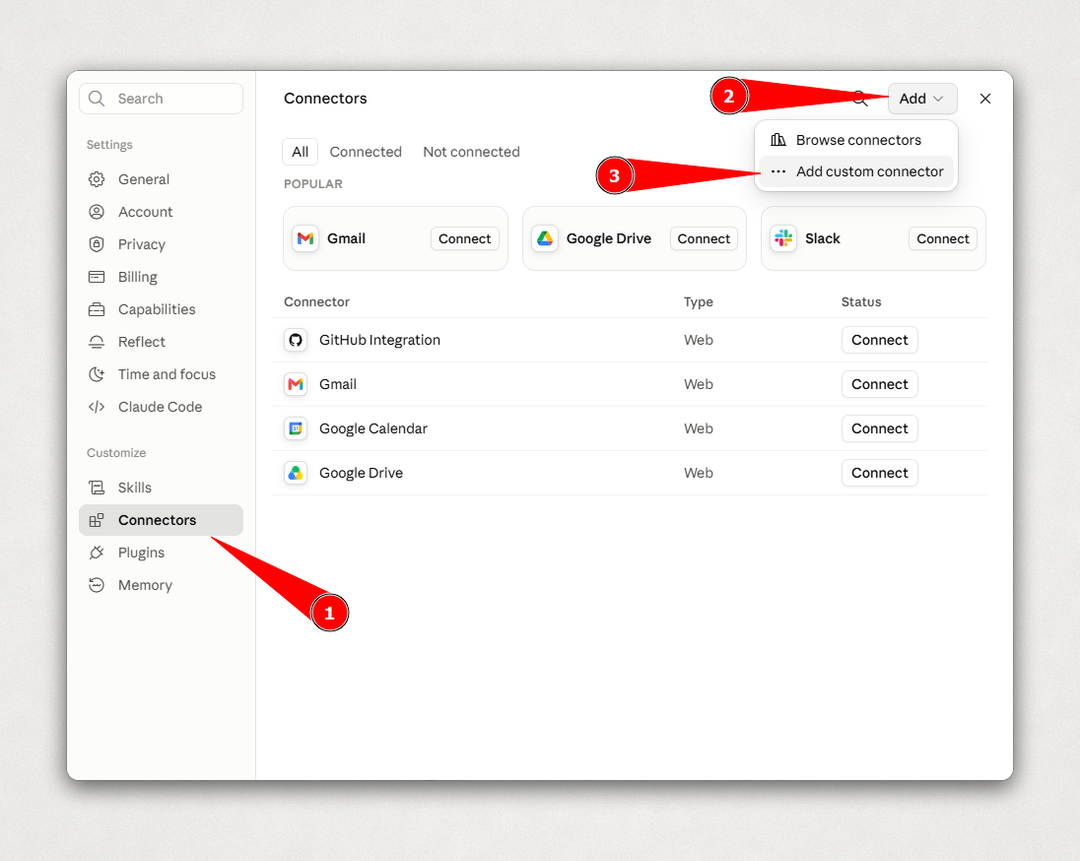
On Claude Free this uses your one custom connector.
Claude Code
claude mcp add --transport http authoredup https://backend.authoredup.com/mcp
Then run /mcp inside Claude Code, choose AuthoredUp and sign in when the browser opens.
ChatGPT
On Business, only admins and owners can turn on Developer mode and add apps, so if that's not you, ask your admin to add AuthoredUp for the workspace.
- Make sure Developer mode is on for your account. On Enterprise and Edu it's under Settings > Apps > Advanced settings, once an admin has given you access.
- In Settings > Apps, choose Create.
- Enter AuthoredUp as the name, paste the server URL as the endpoint and choose OAuth as the authentication.
- Click Scan Tools, then sign in with AuthoredUp and approve access when the prompt appears.
- Click Create. AuthoredUp shows up under your enabled apps with a Dev label, and you can pick it from the tools menu in a new chat.
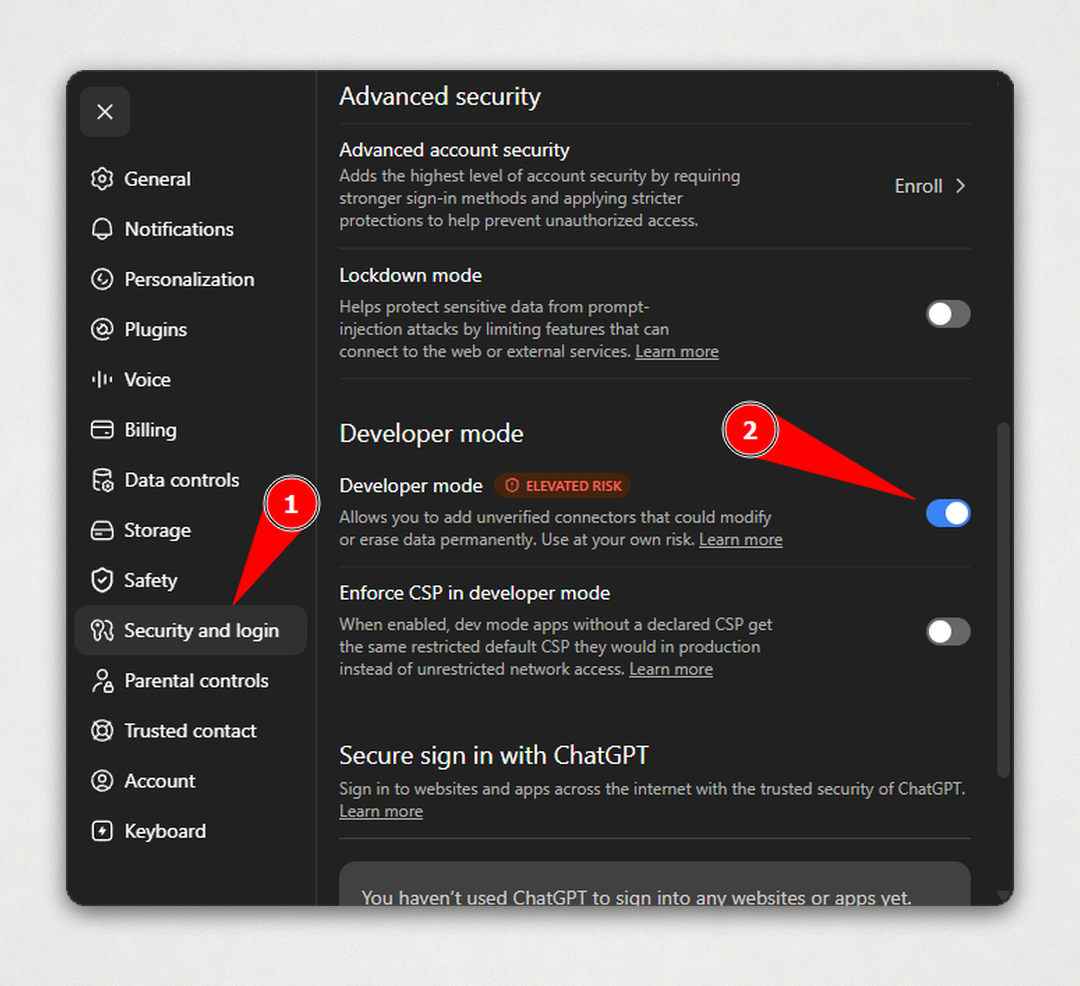
Check it, and turn it off
Every connected assistant appears on the Integrations page of your AuthoredUp account (platform.authoredup.com/account/integrations). Revoking access there cuts the assistant off. There's no password to change and no key to rotate.
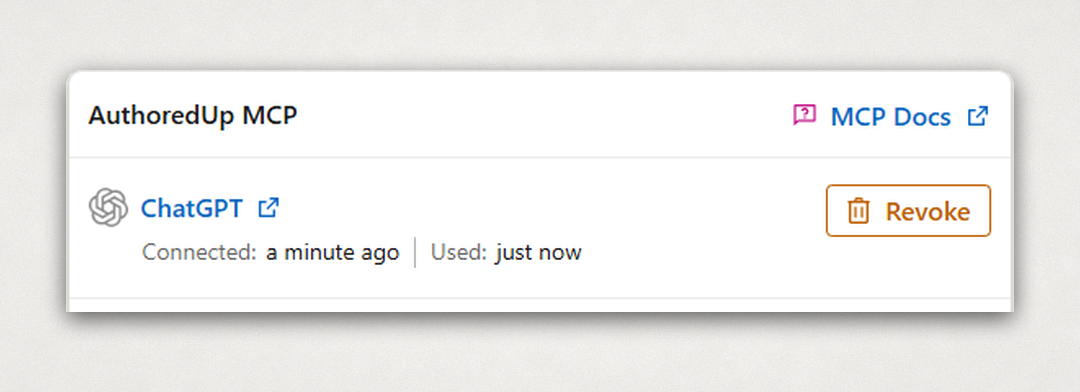
Menus in Claude and ChatGPT change often. Our help article on connecting the AuthoredUp MCP keeps the current steps.
What you can do once it's connected
See how your posts did, work out why, write the next one and put it in your queue, all in one place.
The connection works in both directions. Your assistant can read what AuthoredUp already holds for you: your posts and how each one performed, how your followers and engagement have moved over time, and the posts you've saved from other people. And it can write back into your drafts, which is where it stops being a reporting tool.
We checked every prompt below against the connection's tool definitions and with our product team, and pulled our own recent posts through it while writing this. Each one came back with its text, impressions, reactions, comments, reposts, engagement rate and text metrics, so those are the numbers to build your own prompts on. Members reached, profile views and followers gained show up when available.
1. Find what worked
"Pull my posts from the last 90 days and list the five with the highest engagement rate, with impressions and the first line of each."
The first lines are usually where the pattern shows. Ranking by engagement rate rather than reactions stops your most-seen post from winning by default.
2. Compare formats on your own account
"Compare my text posts with my image posts over the last six months: how many of each, median impressions and median engagement rate."
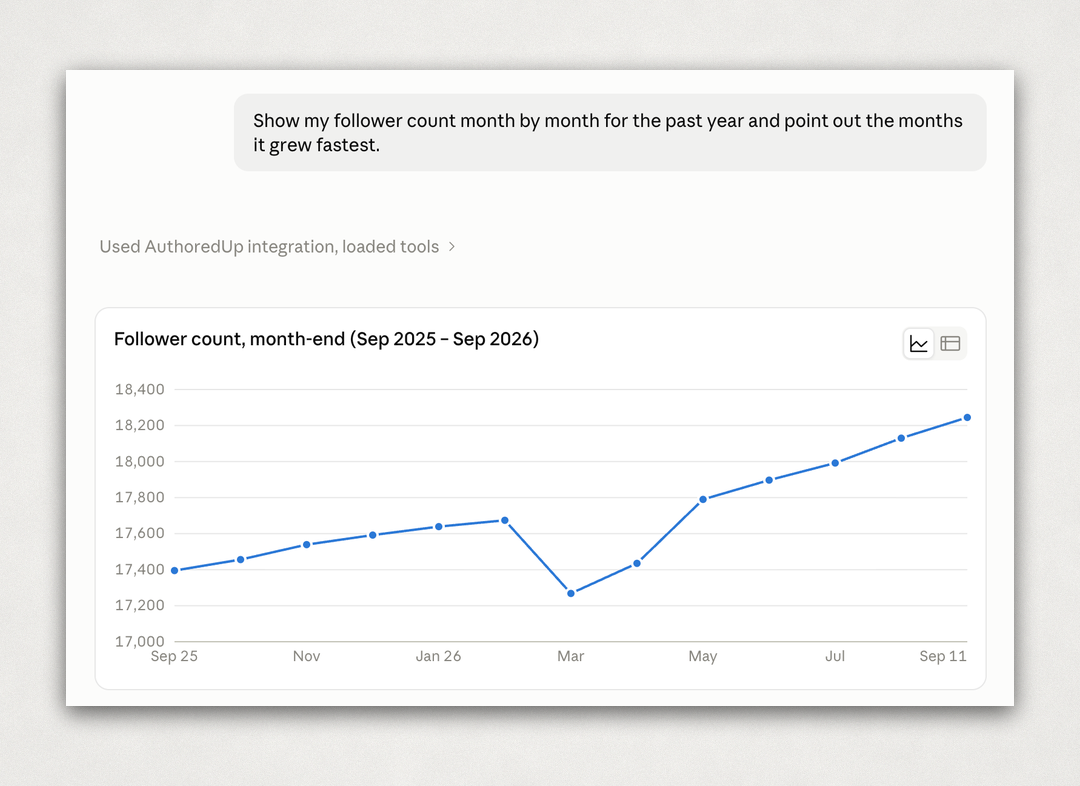
3. Read your growth
"Show my follower count month by month for the past year and point out the months it grew fastest."
Then ask what you posted in those months. The follower history and the posts sit in the same account, so the assistant can line them up. If you post for a company page too, ask the same question about the page. Its history is there as well.
4. Use what you've saved
"Search my saved posts for ones about hiring and tell me what their opening lines have in common."
Every post you save on LinkedIn becomes research material here. Save a few from people in your niche, or from competitors you keep an eye on, and the assistant can pick apart how they open, how long they run and how they're structured. Their impressions stay private to their authors, just as yours do, so the comparison is about the writing, not the reach.
5. Write the next one
"Take my best post from last month and draft a follow-up for my profile, planned for Thursday at 9am, with a reminder."
The draft lands in AuthoredUp looking the way the assistant wrote it. Bold, italics, lists and staircase styling carry over, and it can @-mention people and companies you've tagged in earlier posts.
The planned time works like a note to yourself rather than a scheduled job, so it has to be in the future. With the reminder on, AuthoredUp notifies or emails you when it's time to post. Then open the draft, check the preview, add an image or a carousel if the post needs one, and publish.
6. Keep your drafts in order
"List my drafts, retag the ones about hiring as 'hiring', set the finished ones to ready, and mark anything I haven't touched in three months as deleted."
Useful once the assistant has been drafting for you for a few weeks and the pile has grown. It can also give a draft a title or add collaborators, which helps once a teammate reviews your posts before they go out.
If you'd rather look at the same numbers than ask about them, AuthoredUp's analytics shows them in a dashboard.
Which LinkedIn MCP server should you use?
Start from the job, not the tool.
For finding leads and enriching lists, a data-extraction platform does it without touching your account. Weigh the privacy side for the people you're looking up.
For posting from other workflows, an official-API connector like Zapier's is the simplest lower-risk option. Don't expect analytics from it.
For working on your own content, pick a content-tool server, then match it to how you like to work. If you want the deepest read of how your posts performed, and drafts that land in your queue already formatted and planned, that's what the AuthoredUp connection is built for. If you'd rather schedule straight from the chat, Taplio, MagicPost, Postiv, Supergrow, ContentIn and Postbeam all do it.
The one kind we'd skip is a session server on an account you care about.
Frequently asked questions
Does LinkedIn have an official MCP server?
No. Every LinkedIn MCP server is third-party. LinkedIn does offer an official API, including an endpoint that returns your own post analytics to apps you authorize, but only for posts published through that app. The lower-risk servers build on the API or on data you've already connected.
What is the URL for the LinkedIn MCP server?
There isn't a single URL, because there isn't a single official server. Each tool publishes its own. AuthoredUp's is https://backend.authoredup.com/mcp.
Is there a free LinkedIn MCP server?
The open-source session servers cost nothing to run, and they carry the account risk described above. Content-tool servers come with the tool's plan: AuthoredUp includes its connection on every plan, while others include theirs on paid plans or specific tiers. On the assistant's side, Claude Free allows one custom connector.
Does it work with ChatGPT?
Yes, on Business, Enterprise and Edu plans, where it runs through Developer mode. Pro accounts can connect it with read access only, which covers analysis but not drafting. The AuthoredUp connection uses the same URL in ChatGPT as in Claude.
Can an MCP post to LinkedIn without asking me?
It depends on the server. Session servers and API connectors act as soon as your assistant calls the tool, and both Claude and ChatGPT can ask you to approve tool calls depending on your settings. Taplio, Supergrow, ContentIn and Postbeam say they wait for your approval before publishing. With AuthoredUp, nothing reaches LinkedIn until you publish it yourself from AuthoredUp.
Can Claude optimize my LinkedIn?
It can help you write and review, and it gets much more useful once it can see your data. Without a connection, it answers from general advice about LinkedIn. With one, it can tell you which of your posts beat your own average and draft the next one against them.
Will using a LinkedIn MCP get my account restricted?
A session server can, because it drives your logged-in account, and LinkedIn's User Agreement prohibits that kind of automation. Data-extraction platforms don't use your account. Official-API connectors and content-tool servers act within permissions you grant, and the AuthoredUp connection reads data already stored in your AuthoredUp account rather than acting on LinkedIn.
.svg)
.png)
.svg)
.png)

.png)