


.svg)

.png)
RedactAI is a small, profitable French startup with a sharp focus: AI-generated LinkedIn posts in your writing style. Three pricing tiers ($11.90, $24, $66 billed annually), a real free plan with four posts a month, and a feature most competitors don't have — the ability to model your output after another LinkedIn creator's voice.
Two things complicate the buying decision. First, RedactAI is web-app only. There's no Chrome extension that works inside LinkedIn's compose window. You draft in RedactAI's dashboard, then switch tabs to publish or refine the post. Second, the analytics are thin. RedactAI tracks scheduled-post stats but doesn't import your LinkedIn history, so trends and what's worked over time stay invisible.
For context on size: TrustMRR reports RedactAI at $4,946 MRR and 13,792 visitors in the trailing 30 days as of May 2026. That's a real product with paying users at a fraction of the size of Taplio or Kleo. Useful framing if roadmap risk matters to your buying decision.
If you searched "redactai review" because you want to know whether the $11.90 entry tier (or the $24 Creator plan) is worth it, those three things are what you actually need to weigh. Here's the honest version.
A quick disambiguation before we start: there is a different product called RedactAI v2 that does document redaction for sensitive information. This review is about RedactAI for LinkedIn, the AI post generator at redactai.io. If you landed here looking for the document tool, that's a separate company.
What Is RedactAI?
RedactAI is an AI LinkedIn post generator that learns your writing style from your past posts. The pitch on redactai.io is "Grow faster on LinkedIn with AI posts." You connect your LinkedIn profile, RedactAI analyzes the last 100 posts you've written, and the generator produces drafts that read like your voice rather than ChatGPT's.
The product is a single web app. You log in at redactai.io, draft posts inside the dashboard, schedule them, and track basic performance. There's no Chrome extension that injects into LinkedIn's compose window. There's no mobile app. The whole workflow runs in your browser at the RedactAI domain.
RedactAI is a French startup founded in 2023. The company's LinkedIn page lists around 2,200 followers. TrustMRR reports verified Stripe revenue of $4,946 MRR and 13,792 visitors in the most recent 30-day window. That's small compared to Taplio or Kleo, but it's a real product with paying users and a focused team. The "small but real" framing matters because most "is RedactAI worth it" searches are downstream of pricing comparisons, and price is where RedactAI is most competitive in the category.
The product positioning is sharper than the marketing claims sound. RedactAI is specifically a LinkedIn AI post generator. It is not a full LinkedIn workflow tool, not an analytics platform, not a multi-platform scheduler. If you read the homepage, RedactAI is honest about that scope: this is the tool that drafts the post. What happens to that post afterward (formatting, preview, publishing, measuring) happens somewhere else.
Who Uses RedactAI?
Three audiences buy RedactAI, and they have very different experiences with it.
Solo creators on a tight software budget. This is RedactAI's native fit. You post twice a week, you want help drafting without paying Kleo's $99/month or Taplio's $69/month. RedactAI's free tier (four posts a month) is enough to evaluate. The $11.90 annual Essential plan gives you 15 posts a month, scheduling, and the style-trained generator. For creators on a $20/month software budget, that's a price point that actually fits.
LinkedIn ghostwriters and agencies managing several clients. RedactAI's Copywriter tier ($66/month annual) is built for them. Multiple profiles, the "model after a creator" feature so you can adopt each client's voice, idea generation across niches. Per the Kawaak alternatives roundup, this is the use case where RedactAI's price-to-feature ratio is strongest against larger tools.
AI-curious LinkedIn beginners who want to test what's possible. Highest churn profile. The free plan gets them started, the generated posts are good enough for initial enthusiasm, but the limitation surfaces quickly: only AI-generated posts can be scheduled (per the MagicPost review), and the analytics are basic. Most of this group either upgrades to Creator and stays for a few months, or churns once they want to see what's actually working over time.
Knowing which group you belong to matters before you click "Start for free." The free plan is honest about its constraints, and the upgrade path is reasonable, but the workflow assumptions baked into the product mean RedactAI works very well for one kind of buyer and adequately for everyone else.
RedactAI Features: What You're Actually Getting
AI Post Generator with Style Replication
RedactAI's defining feature. You give the generator a topic, it produces three post variations, each in your trained writing style. The style training pulls from your past LinkedIn posts (the most recent 100) and your profile data (name, headline, experience, description) to anchor tone.
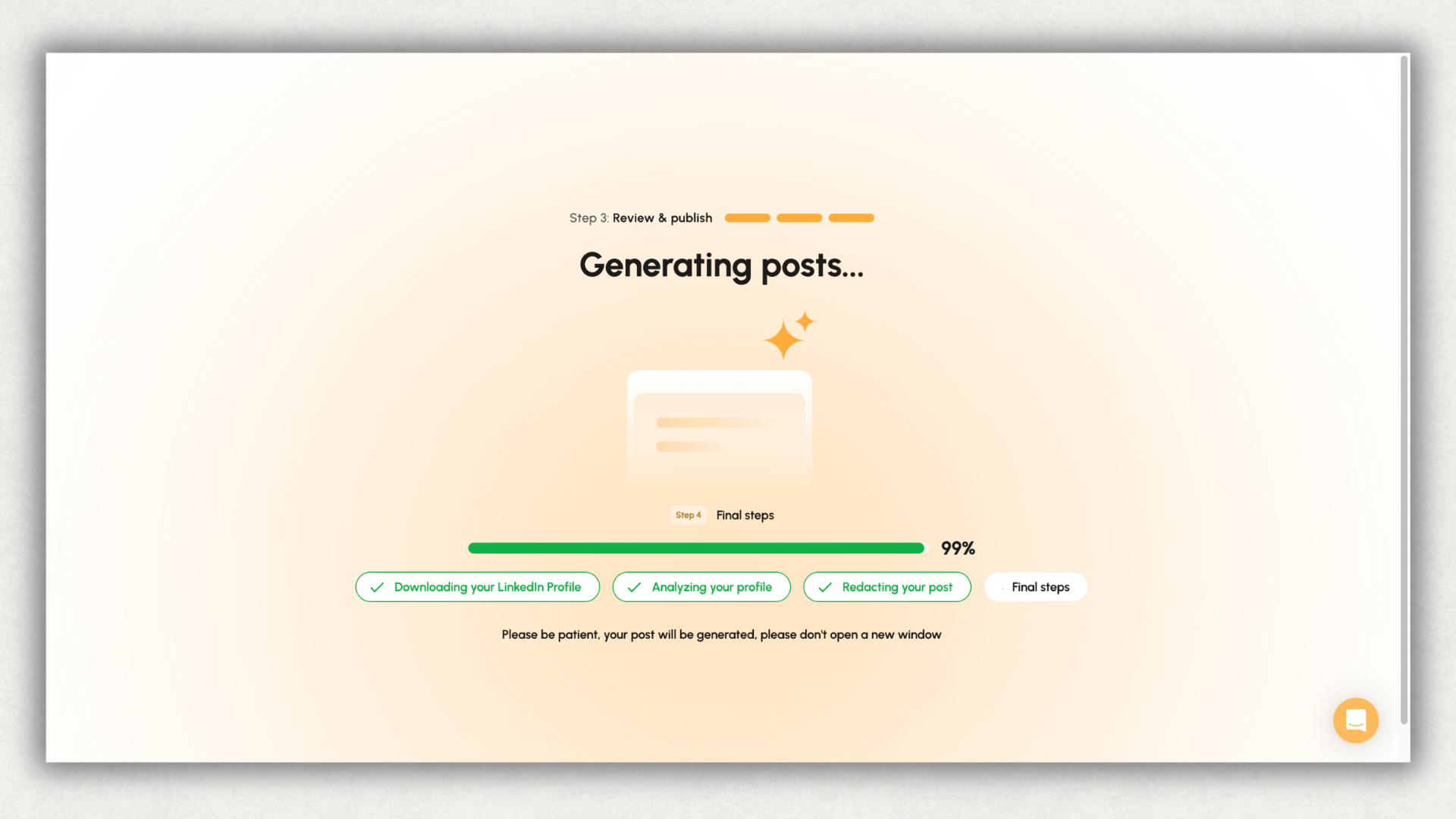
The output quality is genuinely solid when the input is good. Feed it a specific topic with a clear angle, and one of the three variations is usually publishable with light editing. Feed it generic topics, and you get the templated-LinkedIn voice that the MagicPost review flagged as "hooks often feel generic or follow the same templates."
Model After a Creator
RedactAI's most distinctive feature. Pick a LinkedIn creator whose style you want to adopt, and the generator produces posts that approximate that creator's voice. Useful for ghostwriters working across multiple clients, for creators studying a style they admire, and for new posters who don't yet have enough of their own content for the generator to train on.
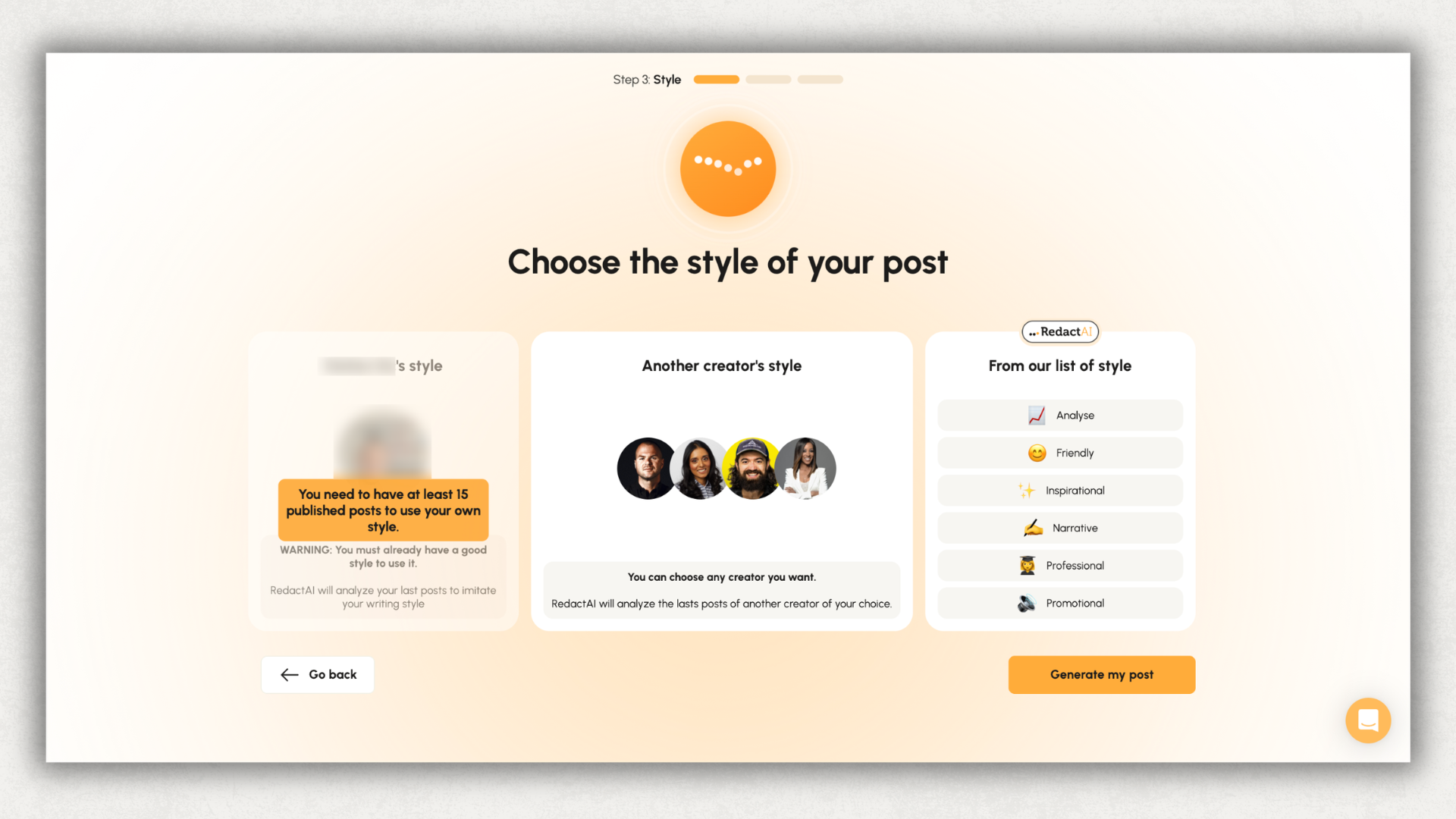
The honest caveat: a post written in someone else's style still has to bring your substance. The story, the number, the specific moment. Style without substance reads as imitation. The creators in our dataset who get the most out of features like this use them as scaffolding (give me the pattern, I'll fill the content) rather than as content generators (write me the post).
Inspiration Tab: Viral LinkedIn Posts in a Live Feed
RedactAI surfaces high-performing LinkedIn posts in your niche so you can see what's working. The Creator plan ($24/month annual) gives you unlimited access; lower tiers limit it. The feed is genuinely useful for idea sparking, and the "recycle post" feature lets you take a viral post structure and adapt it to your own topic with one click.
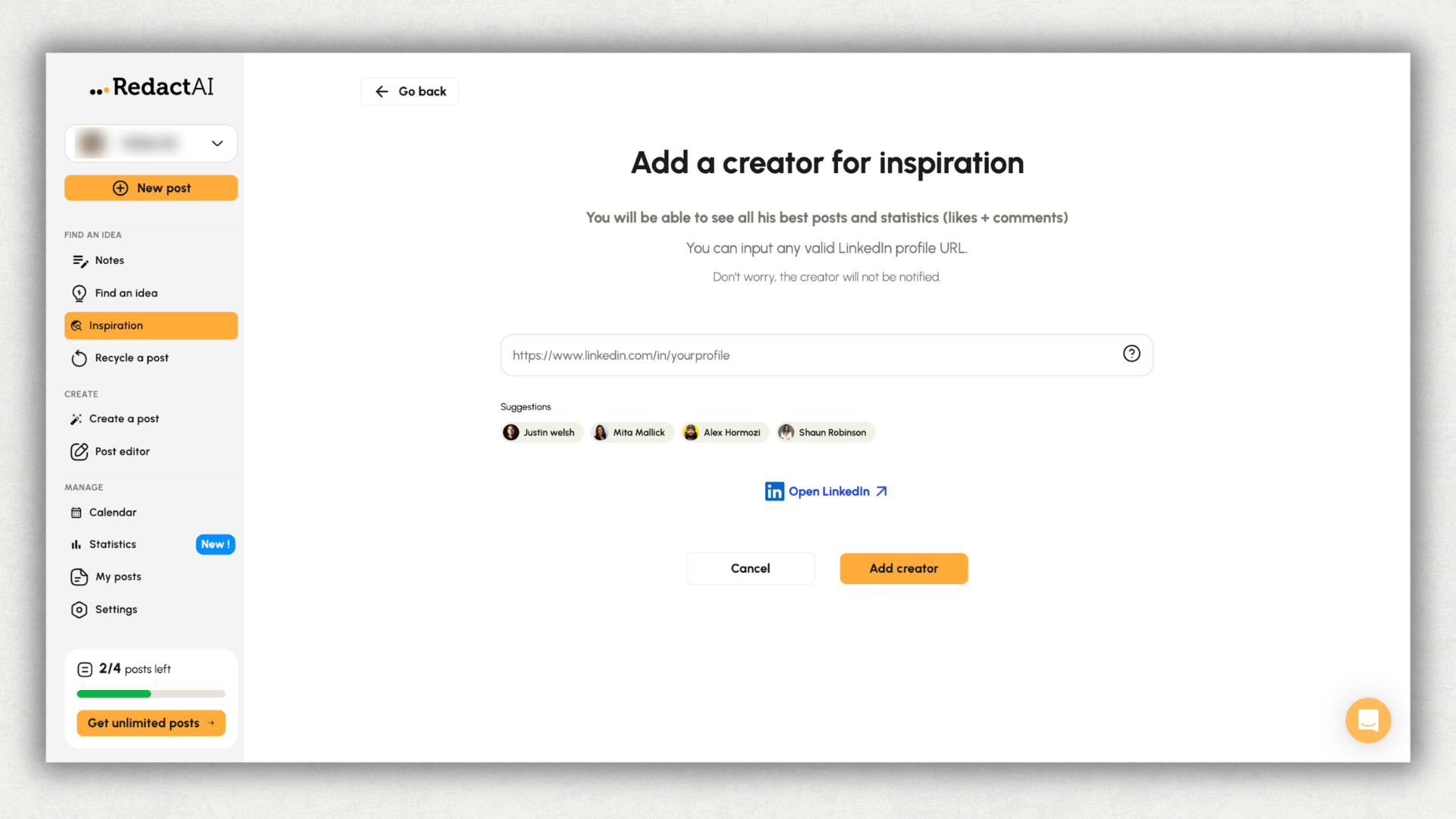
The risk with any inspiration-based workflow is what every templated system runs into. If lots of users see the same viral structure and recycle it, the feed starts to look the same. LinkedIn's 2026 feed is full of posts that follow recognizable patterns: the same three-line opener, the same "Here's how I did X" framing, the same one-word lines for rhythm. Use the inspiration tab as a starting point, not a copy source.
Free Tools (No Login Required)
RedactAI runs three free tools that anyone can use without signing up:
- AI LinkedIn Profile Review. Paste your profile URL, get an analysis and optimization suggestions. This is the strongest organic-search asset RedactAI has; it dominates the first page of Google for "redactai review" queries.
- LinkedIn Post Formatter. Adds bold, italic, strikethrough, and other text styles to your LinkedIn posts via Unicode formatting that renders in the feed.
- LinkedIn Summary Generator. Drafts a LinkedIn "About" section based on inputs you provide.
These tools are well-designed lead magnets. If you want to try the brand before committing, the free profile review is a useful 90-second test of whether RedactAI's voice feels right to you.
Post Scheduling
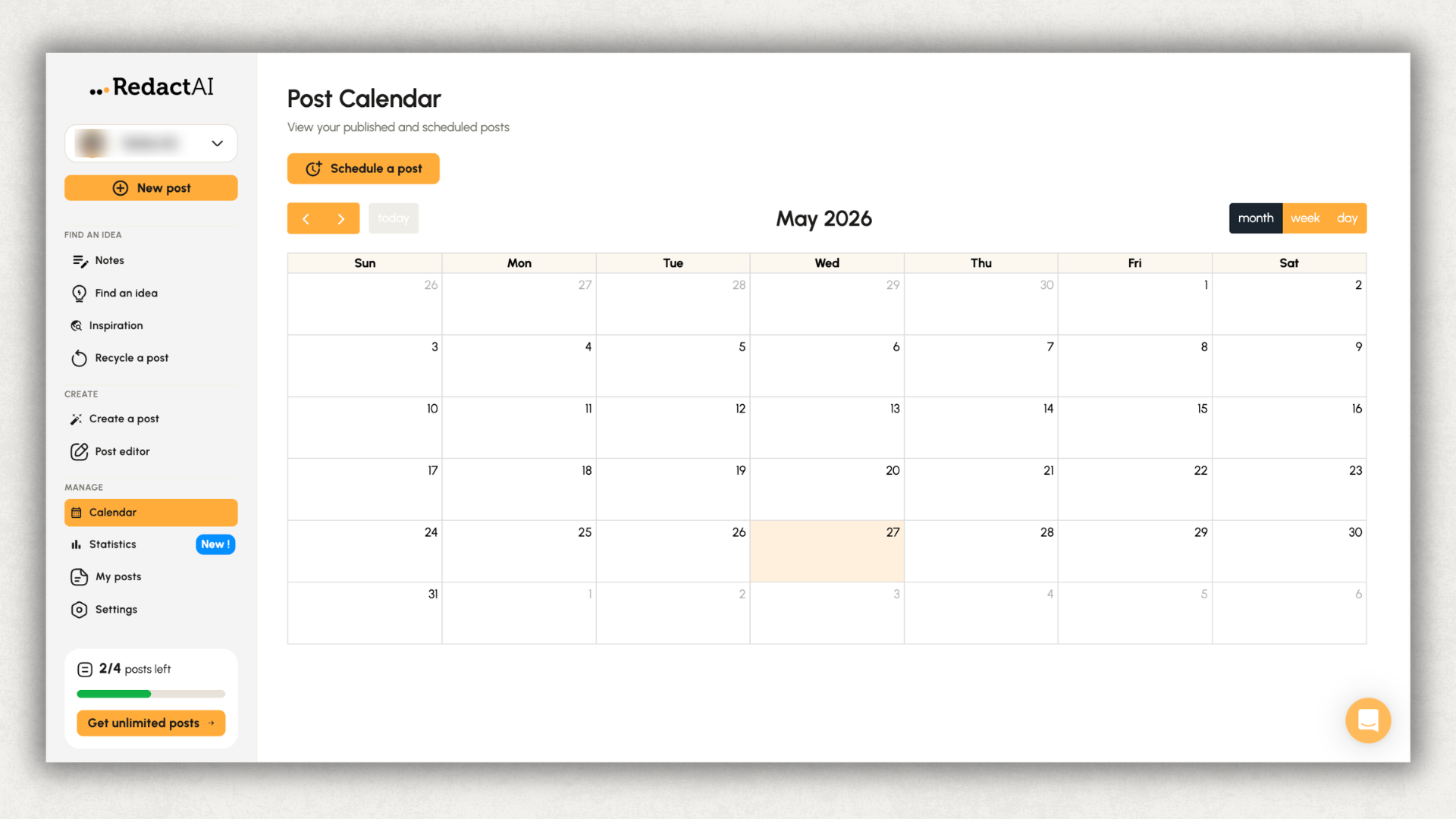
LinkedIn-only scheduling. The interface is clean. You draft a post in RedactAI, set a publish time, the post goes out. Reliable for the basic case.
The catch the MagicPost review surfaced and we verified: only AI-generated posts can be scheduled. If you write a post yourself (without using RedactAI's generator), the scheduling queue doesn't accept it. That's a real workflow constraint for anyone who wants to use RedactAI for AI-assisted drafts plus their own hand-written posts in the same queue.
Basic Analytics
Post performance tracked from the day you schedule a post through RedactAI. Impressions, engagement, basic counts. The dashboard does what it says. The limit is hard, and it's the same limit Kleo has: RedactAI's analytics start when you start scheduling through RedactAI.
Posts you wrote before signing up, posts you publish manually, posts from before you started using the product all stay invisible. If you've been on LinkedIn for two or three years and want to know which hook patterns, topics, or post lengths have actually driven your growth, RedactAI can't tell you.
See how deep LinkedIn analytics changes what you can learn when you import your full posting history.
RedactAI Pricing: What You'll Really Pay
RedactAI runs four tiers: a real free plan and three paid tiers ($11.90, $24, $66 effective monthly when billed annually).
The Free tier is unusually generous for this category. Four posts a month, basic features. Enough to genuinely evaluate whether the generator's style replication works for you. Most "is RedactAI free" searchers are answering this question, and the honest answer is yes, within limits.
The Essential tier at $11.90/month (billed annually, $143.30/year) is the cheapest annual paid entry in the AI-writing-tool category in 2026. You get 15 posts a month, scheduling, preview, basic statistics, and the unlimited idea generator. One LinkedIn profile, two writing styles. For solo creators posting two or three times a week, the math works.
The Creator tier at $24/month (annual, $287.90/year) is the most popular and the only one with unlimited post generation. ChatWithRedactAI (an in-app chat interface for refining posts), unlimited inspiration feed access, unlimited post recycling, 24/5 support. This is the plan most creators upgrade to once they hit Essential's 15-post limit.
The Copywriter tier at $66/month (annual, $791.90/year) adds multi-profile support and priority support. This is the ghostwriter/agency tier. Per the comparisons in the SERP, $66/month is still cheaper than running parallel Creator subscriptions for multiple profiles.
.png)
Compared against the category: AuthoredUp covers writing inside LinkedIn, formatting that renders in the feed, live preview, scheduling, deep analytics, and unlimited company pages for $19.95/month with a 14-day public free trial. See the AuthoredUp pricing breakdown for what's in each plan. Taplio's Growth plan is $69/month billed monthly or $49/month annually. Kleo is $99/month single-tier.
RedactAI is genuinely cheaper than the rest of the AI-writing category at the entry point. The trade is what you give up: no Chrome extension inside LinkedIn, thin analytics, single-platform focus, and the AI-generation-only scheduling constraint.
Is RedactAI Safe to Use on LinkedIn?
Yes. RedactAI is a web app. You draft posts at redactai.io, the product publishes through LinkedIn's standard publishing flow when you schedule a post. There's no Chrome extension overlaying LinkedIn's interface, no scraping, no automation of connections or messages.
From a LinkedIn ToS perspective, RedactAI sits in the same compliance posture as any reputable web-based LinkedIn tool. The product authenticates against LinkedIn's official publishing API, which is the path LinkedIn intends third-party tools to use.
One nuance worth flagging for users who post in regulated industries (finance, healthcare, public sector): some employers and platforms require disclosure when content is AI-assisted or AI-generated. RedactAI doesn't add an "AI-generated" tag to posts you publish through it. The disclosure obligation, if any, is on you. Same as every AI writing tool.
The other safety question worth a one-line answer: there is no published Trustpilot rating for RedactAI as of May 2026 (the listing returned HTTP 403 when we checked). So unlike the Kleo review, we can't anchor this section to a third-party score. The Reddit and product-review signal that does exist is mixed-to-positive on output quality and consistent on the "good price, thin feature set" framing.
For comparison, AuthoredUp has used LinkedIn's standard publishing surface throughout (no scraping, no automation, no cookies, no overlay of LinkedIn's UI) and rates 4.8/5 across 1,000+ Chrome Web Store reviews.
RedactAI Pros and Cons
Does RedactAI's Style Replication Actually Help?
The question isn't whether RedactAI can write a post that sounds like you. It can. Style training works. The question is whether the posts those drafts produce actually perform on LinkedIn.
RedactAI's style training solves the voice problem (it sounds like you, or like the creator you modeled) but does less for the substance problem (you still need to bring the story, the number, the moment). Users who write best with RedactAI treat the AI as a draft partner: bring lived material, let RedactAI handle structure and rhythm. Users who treat RedactAI as a post generator (give it a topic, accept one of the three variations) get the templated-LinkedIn voice everyone else has.
The "model after a creator" feature has the same trade. Style replication works, but a post written in someone else's style with your generic content reads as imitation. The feature is useful as scaffolding for ghostwriters, training wheels for new posters, and reference for style study. It's less useful as a way to skip the substance work.
For creators who already write regularly and want their existing content to land harder (through better formatting, side-by-side post comparison, hook-pattern analysis on years of history), the AI-writing workflow isn't the bottleneck. That's what AuthoredUp's editor inside LinkedIn is built around.
Who Should Use RedactAI (And Who Shouldn't)
RedactAI vs AuthoredUp: How They Compare
The honest version: RedactAI and AuthoredUp are built for different jobs.
RedactAI is an AI LinkedIn post generator. The product centres on style-replication AI writing, with adjacent features (inspiration feed, idea generator, scheduling) that support that core. It does that job well at a price point that's actually affordable. If "help me draft posts that sound like me" is the bottleneck you're solving, RedactAI is a coherent product for it.
AuthoredUp is a LinkedIn content workflow tool. The Chrome extension lives inside LinkedIn's compose window. You write where you publish, with LinkedIn-native formatting (Unicode bold and italics that render in the feed), with live preview on desktop and mobile, with scheduling, with drafts. Your analytics go back years through LinkedIn GDPR archive import. If "help me run my full LinkedIn workflow from one place" is the bottleneck, AuthoredUp covers it at $19.95/month — slightly more than RedactAI's Essential tier but with the workflow integration and analytics depth the lower-priced tools don't offer.
.png)
The analytics gap is the clearest concrete difference. AuthoredUp pulls your full post history from LinkedIn's archive export, every post you've ever written, with engagement data going back years. RedactAI starts from the moment you schedule your first post through the product. If you've been posting on LinkedIn for two or three years, that gap means RedactAI can't show you which hook patterns, post lengths, or topics have actually driven your growth.
The scheduling gap matters too. RedactAI only schedules AI-generated posts. If half your content is hand-written (or AI-drafted in ChatGPT and edited heavily), the RedactAI queue can't help you. AuthoredUp schedules any post you put through the editor, AI-drafted or otherwise.
Coauthor, AuthoredUp's voice-trained AI writing assistant, is in beta. When it ships to general availability, the AI-writing comparison tightens. Coauthor trains on hundreds of your past posts via archive import, which gives it more material than RedactAI's most-recent-100-posts window. Until then, the durable comparison is the one above: workflow integration, scheduling flexibility, and analytics depth.
For creators who want a cheap AI drafting tool and nothing else, RedactAI is a defensible buy. For creators who want a LinkedIn workflow tool that includes AI assistance among other things, AuthoredUp is built differently and priced for that scope.
Is RedactAI Worth It? Our Verdict
RedactAI is worth it if you're buying it for what it actually is: a focused, affordable AI LinkedIn post generator with style replication, a real free tier, and a multi-profile tier ($66) that works for ghostwriters. Solo creators who want help drafting and are happy with a separate-app workflow get real value from the Essential or Creator tiers. The free plan is generous enough to evaluate genuinely before paying.
It's not worth it if you came in expecting a LinkedIn-native experience. The web-app-only constraint means you draft in RedactAI's dashboard and switch tabs to LinkedIn. The formatting work you can do inside RedactAI doesn't render inside LinkedIn's feed the same way LinkedIn-native tools handle it.
It's also not worth it if your bottleneck is anything other than AI drafting. If you write the bulk of your posts yourself and need a scheduler that accepts hand-written content, RedactAI's AI-only queue blocks you. If you need historical analytics, company-page support, team workspaces, or the formatting that renders in feed, RedactAI's feature set doesn't cover those.
Our rating: 3.4/5. Solo creators on a tight software budget who want AI drafting: 4.0/5. Ghostwriters and agencies running multiple individual-creator profiles: 3.5/5. B2B teams plus company-page managers: 2.0/5. Creators who write the bulk of posts themselves and need scheduling: 2.0/5.
RedactAI is a genuinely capable product when used for what it's designed for. The web-app-only workflow, the AI-only scheduling constraint, and the thin analytics narrow that fit substantially.
If you're comparing options, see the broader LinkedIn-tool alternatives list or the best LinkedIn tools in 2026. For the other AI-writing tools in this category, our Taplio review, Kleo review, and Supergrow review break down the same trade-offs at different price points.
FAQ
Is RedactAI free?
Yes, there's a real free plan with four posts a month. The free tier gives you basic features and is enough to evaluate whether the style-replication generator works for your voice. Paid tiers start at $11.90/month (billed annually, Essential plan, 15 posts a month) and rise to $24/month (Creator, unlimited posts) and $66/month (Copywriter, multi-profile). RedactAI also runs three free tools that don't require an account: AI LinkedIn Profile Review, LinkedIn Post Formatter, and LinkedIn Summary Generator.
What is RedactAI?
RedactAI is a web-based AI LinkedIn post generator that learns your writing style from your most recent 100 LinkedIn posts and drafts new content in that voice. It's a focused single-purpose tool: drafting LinkedIn posts. The web app handles draft generation, basic scheduling for AI-generated posts, an inspiration feed of trending posts in your niche, and an "idea generator" for breaking through writer's block. It is not a full LinkedIn workflow tool — there's no Chrome extension inside LinkedIn's compose window, no historical analytics via archive import, and no company-page support.
Is RedactAI worth it?
For solo creators on a tight software budget who want AI drafting and can work in a separate web app, yes. The Essential tier at $11.90/month annual is the cheapest entry in the AI-writing-tool category in 2026, and the free plan is genuinely usable. For ghostwriters managing multiple clients, the $66 Copywriter tier is competitive. For LinkedIn-native workflows, team setups, company pages, or anyone who needs real analytics depth, RedactAI's feature set doesn't cover the work.
Which AI content generator is best for LinkedIn?
The right tool depends on the bottleneck you're solving. For affordable AI drafting in a separate web app: RedactAI. For premium AI drafting with persistent voice training and a deep template library: Kleo (at $99/month). For AI drafting plus LinkedIn prospecting in a sales context: Taplio. For the full LinkedIn workflow inside LinkedIn (writing, formatting, scheduling, archive analytics, company pages) including AI assistance once Coauthor goes GA: AuthoredUp. See the best LinkedIn tools in 2026 for the side-by-side breakdown.
Does RedactAI work inside LinkedIn?
No. RedactAI is a web app at redactai.io. You draft posts inside RedactAI's dashboard, then publish or schedule. There's no Chrome extension that works inside LinkedIn's compose window. If you want to write and format directly inside LinkedIn (with formatting that renders in the feed), AuthoredUp's Chrome extension does that.
Can I schedule posts I wrote myself in RedactAI?
No. Per the MagicPost review and our verification, RedactAI's scheduling queue only accepts AI-generated posts. If you wrote a post yourself (without using RedactAI's generator), you can't add it to the queue. This is a real workflow constraint for anyone using RedactAI alongside their own writing.
Does RedactAI support LinkedIn company pages?
No. RedactAI's product and pricing pages describe individual-creator use cases only. The Copywriter tier ($66/month) adds multi-profile support, but those are individual personal profiles (typical for ghostwriters managing several client accounts), not company pages. AuthoredUp includes unlimited company pages on every plan at no additional cost.
.svg)
.png)

.svg)
.png)
.png)