


.svg)

.png)
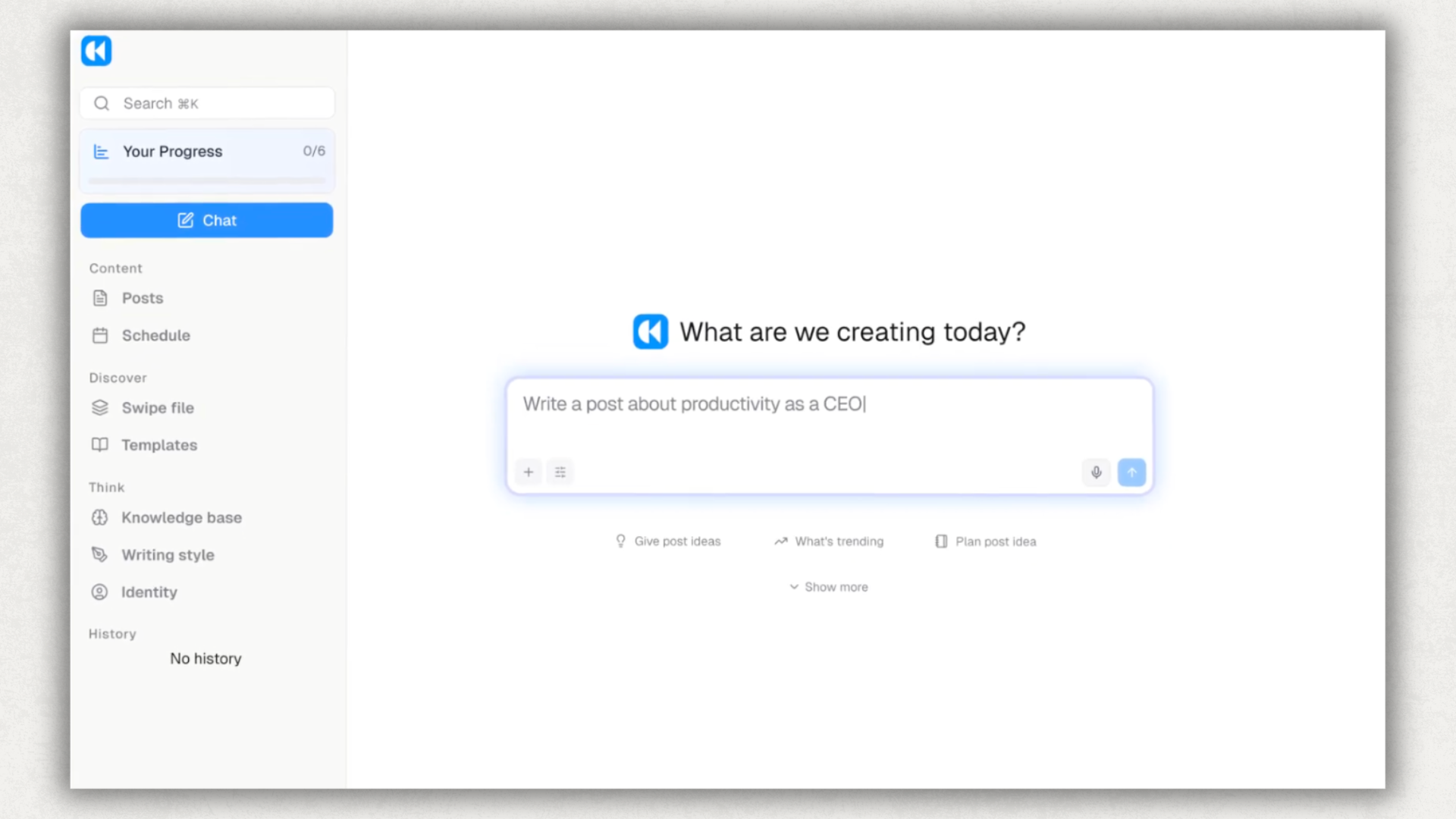
Kleo is a thoughtfully built product with a loyal creator following. The product opens with "Your next post, faster and better" and a chat window asking "What are we creating today?" and that posture runs through the whole experience. The AI writes posts that sound like you, the template library is deep and well-curated, and the interface is polished. The current version (Kleo 3.0 as of mid-2026) bills itself as "everything you need to ideate, write, design, and publish posts in one place," and for the right buyer it delivers on that.
Two things shape whether it's the right fit. First, the price: $99/month on a single plan, with no public free trial linked on the pricing page. That sits at the premium end of the AI-writing category. Second, the workflow: Kleo's original in-LinkedIn Chrome extension reached 70,000+ users before LinkedIn asked the team to take it down in 2025. Kleo 3.0 is now a paid web app. You write there, then switch to LinkedIn to publish.
If you're searching "kleo review" because you want to know whether $99/month is worth it for your situation, those two factors are what to weigh. Here's a fair breakdown.
What Is Kleo?
Kleo is an AI-first personal brand tool for LinkedIn (and partially X/Twitter). Founded by Jake Ward, Lara Acosta, Rob Hoffman, and Cam Trew. The current pitch on kleo.so is "writing like an industry expert has never been easier," organized around three verbs: Create (drafting, graphics, scheduling), Discover (swipe file, templates, ideas), and Think (knowledge base, writing style, identity, automatic memories). Kleo positions itself in its own FAQ as "ChatGPT trained on you and optimized for publishing."
The product has gone through three chapters. Kleo 1.0 (2022–2024) was a free Chrome extension that worked inside LinkedIn itself. You'd open a LinkedIn compose window, the extension would inject Kleo's interface into LinkedIn, you'd write your post there. That version reached 70,000+ users before LinkedIn intervened.
In 2025, LinkedIn issued a cease-and-desist on Kleo's Chrome extension. The reason was that the extension overlaid LinkedIn's UI and scraped the interface to provide features. That violates LinkedIn's User Agreement against scraping.
Kleo relaunched as a paid web platform at kleo.so. The current Chrome extension (bundled into the subscription) was repurposed for capturing inspiration from articles around the web, rather than in-LinkedIn editing. Kleo 3.0 launched in 2026 with a second-brain framing (store knowledge, train writing style, define identity, automatic memories) and a focused, paid creator community. The product still works well for what it's built to do. It just lives in a different place now, and the workflow for users has shifted from "write inside LinkedIn" to "write in Kleo's web app, publish on LinkedIn."
Who Uses Kleo?
Three audiences buy Kleo, and they have very different experiences with it.
Solo personal-brand creators with budget. This is Kleo's native fit. You post 3–5 times a week, you want help with ideation and voice, you're happy to draft in a separate app, and $99/month doesn't blow up your budget. The persistent memory, voice training, and 160+ post templates do real work for you. The 30-day money-back guarantee on the annual plan gives you a real evaluation window.
B2B marketers and consultants. Come in for the AI writing, expect a LinkedIn-native experience, hit the tab-switching workflow. The product is good. The workflow doesn't match how they thought they'd use it. Several switch to LinkedIn-native tools within 60 days; others stay because the writing quality justifies the friction.
Solopreneurs and content creators on a $20–50/mo software budget. Highest churn profile. The $99/month price doesn't have a public trial to test against. Most never start. The ones who do often leave inside the 30-day money-back window, not because Kleo is bad, but because cheaper LinkedIn-native tools cover their actual needs (write, format, schedule, see what worked).
Knowing which group you belong to matters before you click "Start free trial," and matters more when you realize that link goes to a "Get in touch for a limited-time offer" form, not a self-serve trial.
Kleo Features: What You're Actually Getting
AI Post Generator with Persistent Voice Training
Kleo's defining feature, delivered through a chat interface. You feed it samples of your past posts (or pick from a library of frameworks borrowed from popular creators, for example Lara Acosta's viral-post framework), and it learns your patterns: vocabulary, sentence rhythm, hook style, how you open and how you close. Then when you ask it to write a post on a topic, the output sounds like a Kleo-trained version of you.

A nice touch most AI writing tools don't bother with: Kleo will also explain why a generated post is built the way it is, walking you through the hook, the angle, and the structural choice. For newer creators that doubles as a learning experience: you're not just getting a draft, you're getting a small lesson on what makes the format work. It's one of the more genuinely creator-educational AI experiences in the category.
The persistent memory matters too. Unlike chat-based AI tools where every conversation starts cold, Kleo remembers your voice settings across sessions through its "automatic memories" feature. You don't re-explain who you are every time.
The output quality is genuinely good when the input is good. Feed it strong sample posts, give it a specific prompt, and the draft you get back is publishable with light editing. Feed it generic prompts, and you get generic posts. Same as any AI writing tool.
200+ Hook Templates and 160+ Post Templates
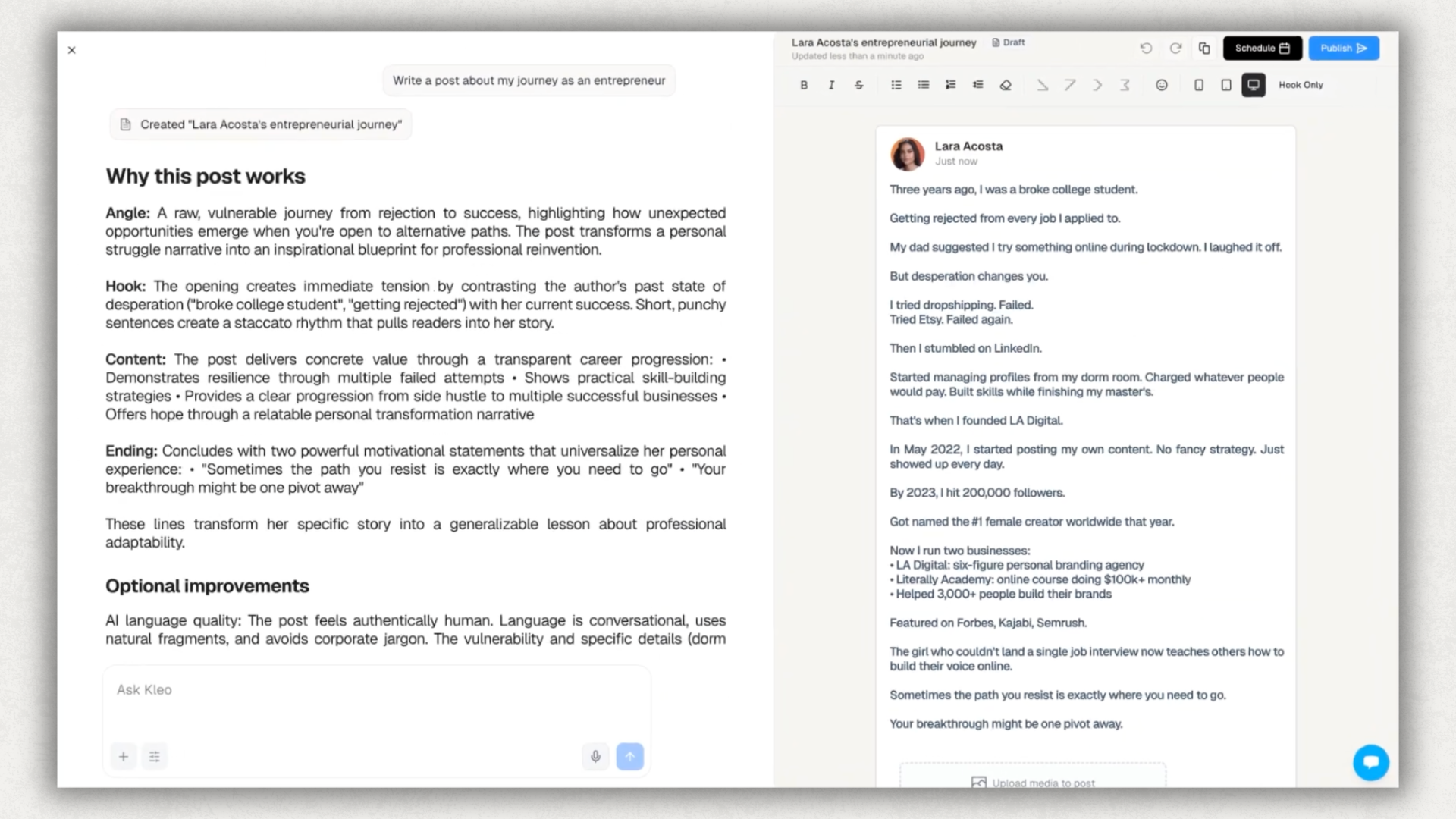
Kleo's other major asset. The hook library is well-curated. Patterns that have worked on LinkedIn, sorted by style (curiosity, contrarian, story-opener, list-promise). The 160+ full post templates are plug-and-play: personal brand introduction, event promo, social proof, David vs Goliath, "don't do this, do this instead."
The tradeoff is what every templated system runs into. If the templates work, lots of people use them, and the output starts to look the same. LinkedIn's feed in 2026 is full of posts that follow recognizable patterns: the same three-line opener, the same "Here's how I…" framing, the same one-word lines for rhythm. Templates that already work tend to flatten the thing they were supposed to amplify, which is your voice.
Knowledge Base and Brand Identity
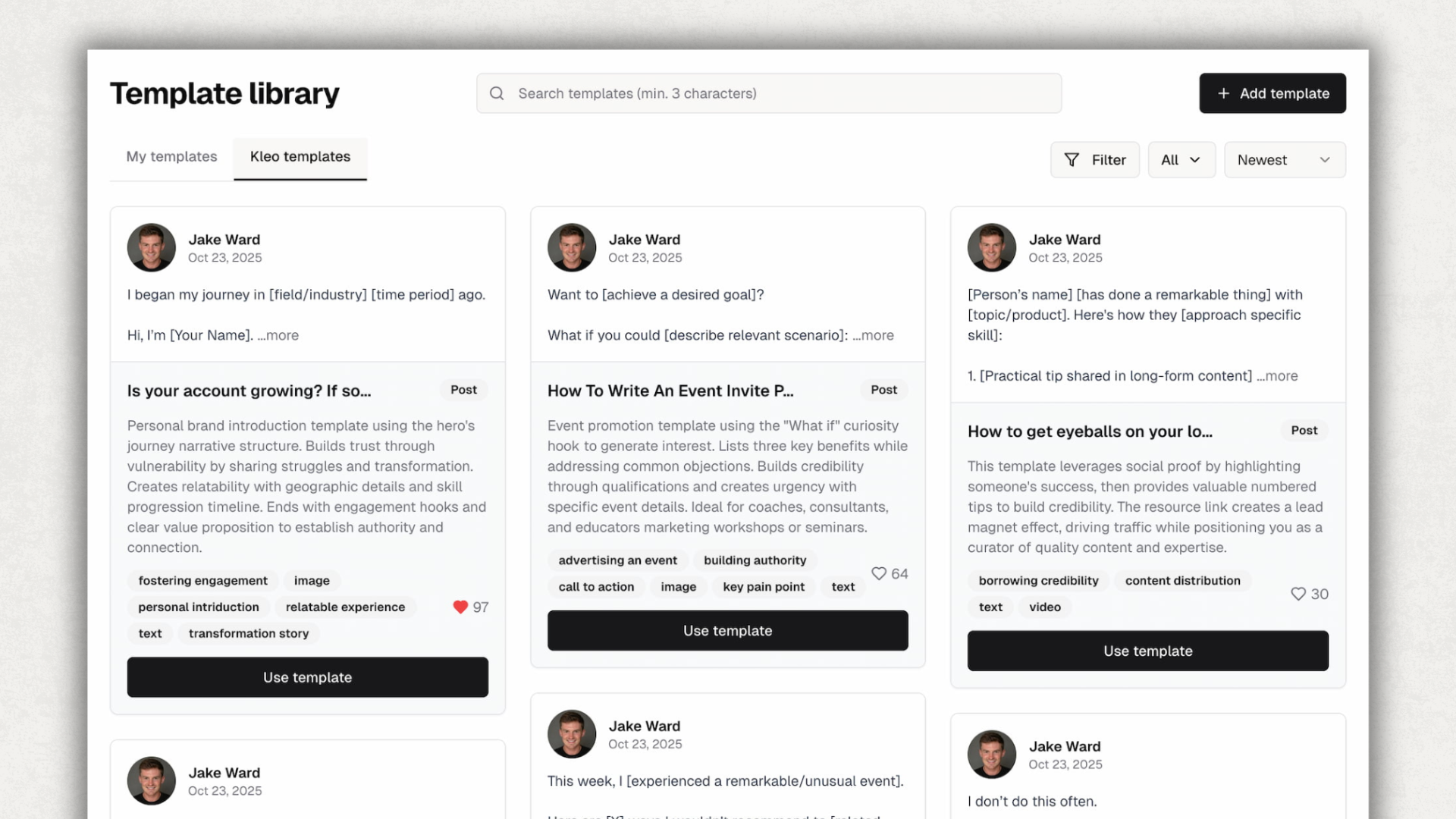
Two features unique to Kleo in this category. The knowledge base lets you store reusable expertise (your case studies, your frameworks, your client wins) and the AI pulls from it when drafting. The brand identity feature is a structured definition of who you are, what you stand for, and who you're talking to. That definition gets fed into every prompt.
For consultants, agencies, and personal-brand creators with a clear positioning story, these are genuinely useful. For someone still figuring out what they want to be known for, they add setup friction without immediate payoff.
Content Calendar and Scheduling
Clean calendar view. Drag-and-drop scheduling. You queue posts from Kleo's web app, they publish to LinkedIn at the scheduled time. Reliable. The interface is well-designed.
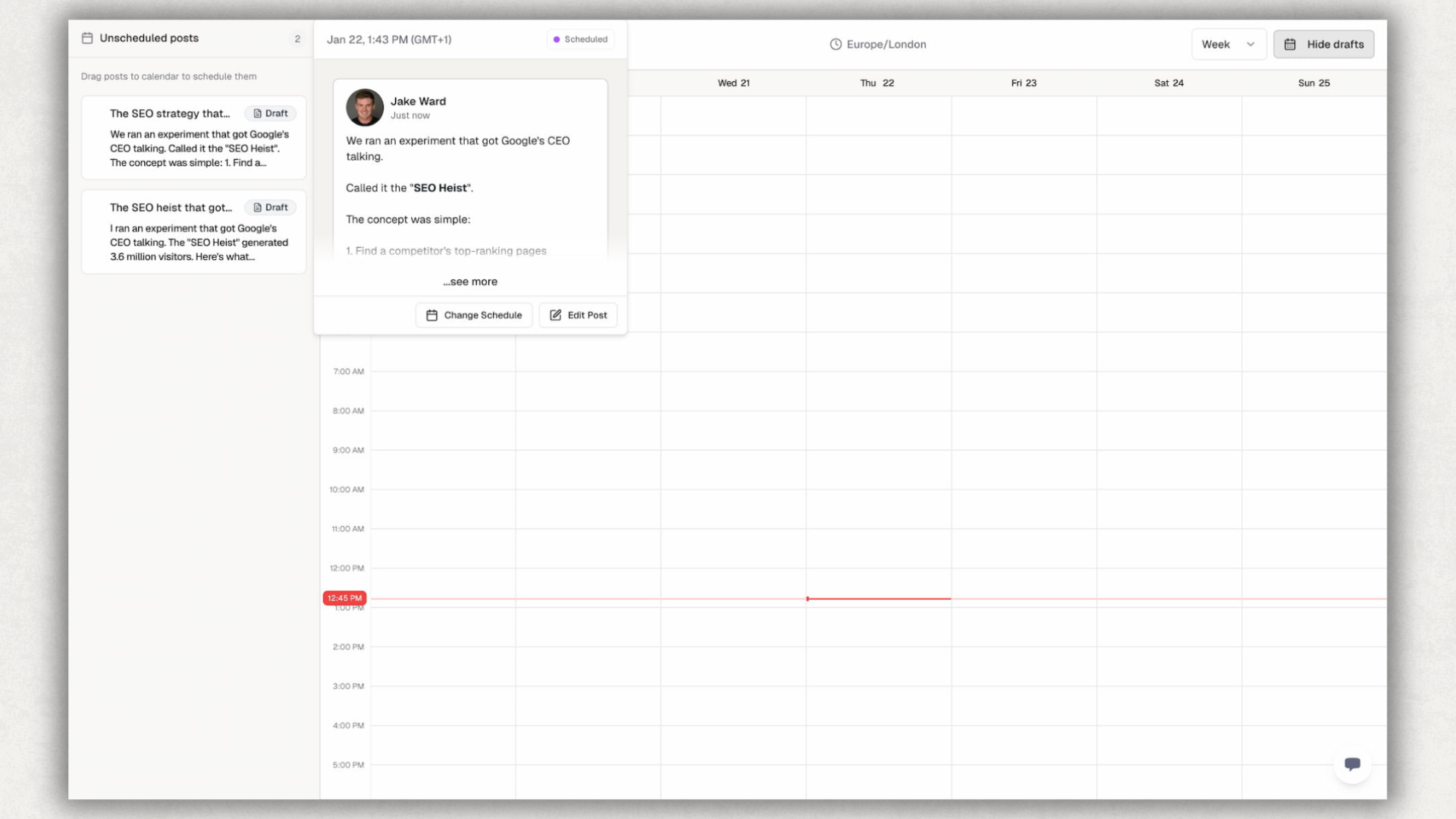
The workflow note: you draft in Kleo, you preview in Kleo's web preview (which approximates how the post will look on LinkedIn), then Kleo posts it. You don't see the actual LinkedIn feed render until after publish. For posts that depend on formatting (Unicode bold, italics, custom bullets), this is where the gap with LinkedIn-native tools shows up.
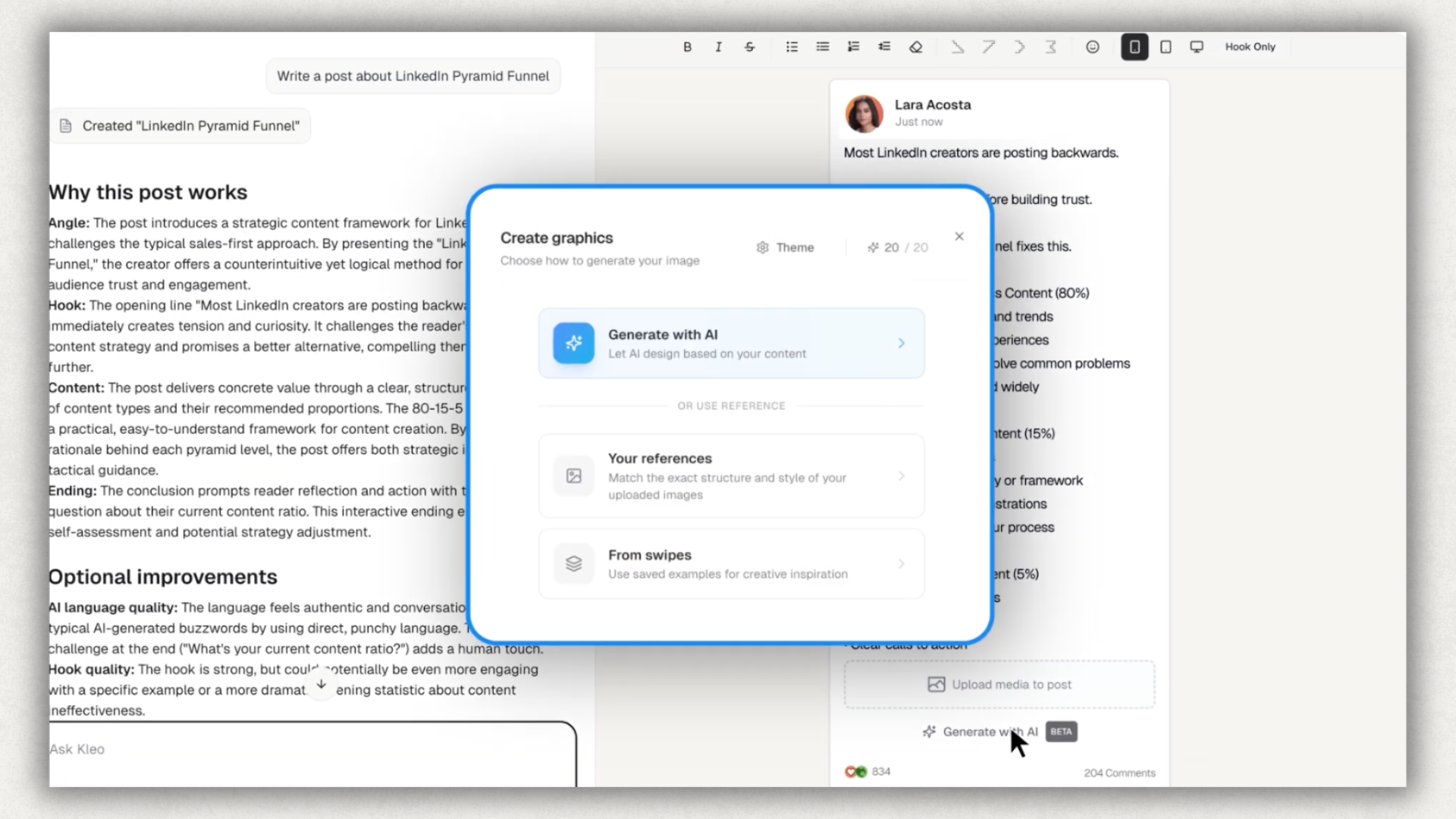
Graphic Generation (20/month)
AI image generation tied to your post content. You write the post, click a button, get a branded image to attach. Useful when you want a visual but don't want to open Figma or Canva. Limited to 20 generations per month even on the highest plan.
Trending Research and Inspiration Capture
Kleo surfaces trending posts in your niche so you can see what's gaining traction. The repurposed Chrome extension (post-shutdown) captures inspiration from web articles into your swipe file. Read something interesting, click the Kleo button, save it as a post idea.
Analytics Dashboard
Post performance tracked from the day you connect your LinkedIn account. Impressions, engagement rate, follower growth, top performers. The dashboard is clean and the data is accurate.
The limit is hard. Kleo's analytics start the day you connect. If you've been on LinkedIn for three years and want to understand what's been working over that time (which hooks land, which topics drive saves, which post lengths your audience actually finishes), Kleo can only tell you about the period since signup. See how deep LinkedIn analytics changes what you can learn from your full content history.
Kleo Pricing: What You'll Really Pay
Kleo runs a single tier at $99/month or $999/year. There's no "starter" plan, no AI credit limit to upgrade past, no add-on you can buy at a lower price. You pay $99/month for the full product, or you don't use it.
The annual plan brings the effective rate to about $83/month and adds onboarding, priority support, and a 30-day money-back guarantee. That guarantee is your only real trial mechanism. You commit to $999, you have 30 days to use the product, and if it doesn't work you refund out.
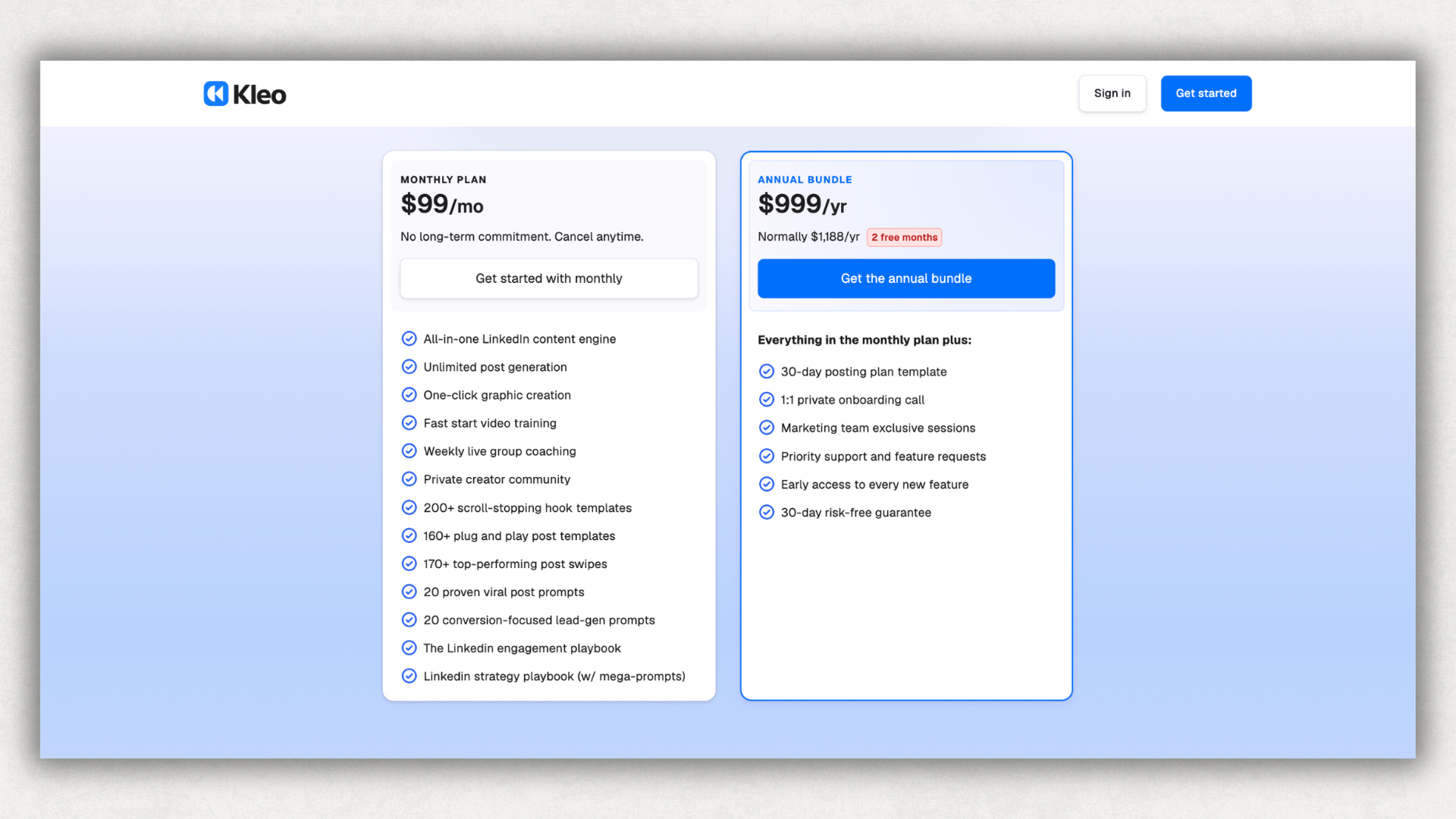
Compared against the category: Taplio's Growth plan (the one with AI features) is $69/month billed monthly or $49/month annual. AuthoredUp covers writing inside LinkedIn with Coauthor, plus formatting, preview, scheduling, deep analytics, and unlimited company pages for $19.95/month with a 14-day public free trial. See the AuthoredUp pricing breakdown for what's in each plan. Supergrow and ContentIn sit between those two.
Kleo is not subtly more expensive. It's 5× more expensive than AuthoredUp on the monthly comparison. For solo creators where Kleo's swipe-file-and-coaching ecosystem is the central feature, that gap may be worth it. For buyers who want the full LinkedIn workflow (write, format, preview, schedule, analyze, drafts, company pages) on a LinkedIn-native surface, the gap is hard to justify.
Is Kleo Safe to Use on LinkedIn?
This question deserves a careful answer because the honest version has two parts.
The Kleo 2.0 era (now): yes, it's safe. The current product is a web app at kleo.so. You draft posts there, then publish to LinkedIn through LinkedIn's own publishing flow. The current Chrome extension only captures inspiration from web articles outside LinkedIn. It doesn't overlay LinkedIn's UI, doesn't scrape your feed, doesn't automate connections or messages. From a LinkedIn ToS perspective, post-pivot Kleo is in the same compliance posture as any reputable LinkedIn tool.
The Kleo 1.0 era (2022–2024): this is what happened. Kleo's original Chrome extension reached 70,000+ users by injecting Kleo's interface into LinkedIn's compose window. The extension read parts of LinkedIn's interface to display analytics, enable scheduling, and surface inspiration. LinkedIn's ToS prohibits "scraping, copying, or otherwise accessing the Services or any data or content on the Services through automated means without prior written consent." LinkedIn issued a cease-and-desist. Kleo complied and rebuilt as a web app. The Reddit thread on r/socialmedia documents the user-side experience.
What this means for new buyers in 2026. If you're signing up for Kleo today, you're signing up for a web app. There is no ongoing safety concern with the current product. The shutdown is relevant only because it explains why you now draft in Kleo's web app and switch tabs to LinkedIn, instead of writing inside LinkedIn itself. That workflow change is the durable thing to factor into the buying decision.
Trustpilot score: 3.5/5 (trustpilot.com/review/kleo.so, December 2025). Single review, so a small sample. The review is positive on writing quality and critical on price. Limited signal, but the only third-party score available.
For comparison, AuthoredUp has used LinkedIn's standard publishing surface throughout (no scraping, no automation, no cookies, no overlay of LinkedIn's UI) and rates 4.8/5 across 1,000+ Chrome Web Store reviews.
Kleo Pros and Cons
Does Kleo's AI Voice Training Actually Help You Write Better?
The question isn't whether Kleo can produce a post that sounds like you. It can. Voice training works. The question is whether what comes out actually performs on LinkedIn, and whether Kleo's approach to "training" is the deepest version available now that other tools train on the same surface.
The pattern is well-documented in our dataset of 600,000+ LinkedIn posts: content with personal specificity (first-person stories, specific numbers tied to lived experience, references to actual events) consistently out-engages content that is structurally generic, regardless of how polished the writing is.
That's not an argument against AI writing tools. It's an argument about how an AI writing tool gets good. Kleo's voice training is sample-based: you paste in posts you wrote, it learns the patterns, then it remembers settings across sessions via the "automatic memories" feature. The model never sees the engagement data behind those samples. It learns what you sound like, not which of your posts actually worked.
AuthoredUp's Coauthor (launching out of beta in 2026) trains on a different signal. When you import your LinkedIn archive, Coauthor sees every post you've ever published plus the engagement each one earned: impressions, reactions, comments, reshares, follower deltas. That second layer matters. The model learns your voice and which versions of your voice your audience actually responded to. The hook patterns that landed for you specifically. The post lengths that finished. The topics that drove saves.
Both tools create. The difference is what they're grounded in. Sample-based voice training matches your style. Archive-plus-performance training matches your style and what worked.
For creators who already write regularly and want their content to land harder, the AI-writing workflow is one piece of a longer chain: drafting, formatting, previewing, scheduling, then learning from what happened. That's what AuthoredUp's full editor is built around, with Coauthor now sitting at the front of it.
Who Should Use Kleo (And Who Shouldn't)
Kleo vs AuthoredUp: How They Compare
The honest version: both tools now do AI writing. What separates them is what surrounds the writing.
Kleo is an AI-first personal brand tool. The product centres on AI writing with sample-based voice training, plus a content system (templates, knowledge base, brand identity) that feeds the AI. Drafting happens in Kleo's web app. Publishing happens on LinkedIn. The two are different surfaces, and the formatting that renders in LinkedIn's feed isn't something Kleo can fully control from its side.
AuthoredUp is a LinkedIn content workflow tool, and as of 2026 it does AI writing too. The Chrome extension lives inside LinkedIn's compose window. Coauthor (out of beta in 2026) generates drafts trained on your LinkedIn archive and the engagement those posts earned. Then you format with Unicode bold and italics that render in the feed, preview live on desktop and mobile, schedule, and analyze. One product, one surface, the whole workflow. $19.95/month for the individual plan, or $16.63/month on annual ($199.50/year).
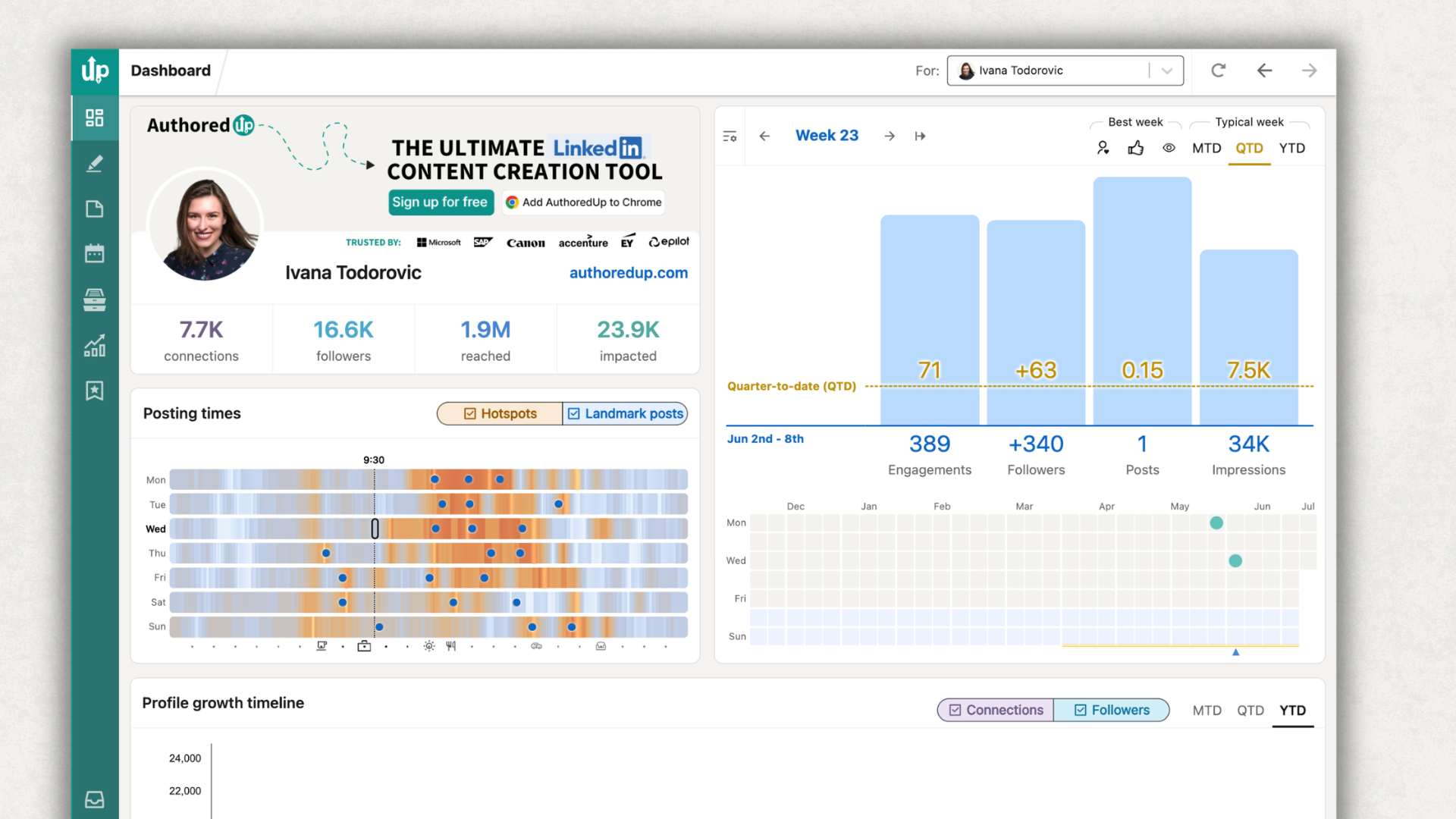
Two concrete gaps remain. First, analytics depth. AuthoredUp pulls your full post history from LinkedIn's archive export, every post you've ever written, with engagement data going back years. Kleo starts tracking from the moment you connect your account. If you've been posting on LinkedIn for two or three years, that gap means Kleo can't show you (or its AI) which hook patterns, post lengths, or topics have actually driven your growth over time.
Second, the publishing surface. Kleo writes in a web app and hands off to LinkedIn. AuthoredUp writes inside LinkedIn. Most of the time that workflow difference is invisible. The moments it isn't are when LinkedIn's compose window changes, when you want to format mid-paragraph, or when you want to see exactly what the post will look like on mobile before you schedule it. Those moments add up if you publish 3–5 times a week.
For solo personal-brand creators with a $99/month budget who specifically want Kleo's swipe-file-and-template ecosystem, Kleo is a coherent product. For everyone else (cost-conscious solo creators, B2B teams, company-page managers, ghostwriters, agencies), AuthoredUp covers create + format + publish + analyze inside a single tool at a much lower price.
Is Kleo Worth It? Our Verdict
Kleo is worth $99/month if you're buying it for what it actually is: a premium AI-first personal brand tool with sample-based voice training, a deep template library, a swipe-file system, and a polished web app. Solo creators with budget who write 3–5 posts a week and value Kleo's specific ecosystem (the founders' creator community, the weekly group coaching, the curated swipes) will get real work out of it. The 30-day money-back guarantee on the annual plan gives you a real evaluation window.
It's harder to justify on three fronts. First, Kleo writing lives in a separate web app since the 2025 Chrome extension shutdown. You draft there, switch tabs to LinkedIn to publish, and the LinkedIn-native formatting (Unicode bold, italics, custom bullets that render in the feed) isn't something Kleo handles from its side. Second, the AI-writing argument that once justified the price gap (Kleo creates, other tools polish) doesn't hold anymore now that AuthoredUp's Coauthor writes too, trained on your full LinkedIn archive instead of just samples. Third, Kleo's own public footprint (1,205 creators on its homepage) is a long way from the 70K the Chrome extension reached, which makes the "$99/month for the leading creator tool" framing harder to sustain.
It's also not worth it if your real bottleneck is anything other than AI writing. If you need deeper analytics, company page support, team collaboration, formatting that renders in the feed, or simply a tool that costs less than your phone bill, cheaper and more LinkedIn-focused options do that work better, and now do AI writing too.
Our rating: 3.3/5. Solo personal-brand creators who specifically want Kleo's swipes-and-community ecosystem: 4.0/5. B2B teams plus company-page managers: 1.8/5. Content creators on a sub-$50/month software budget: 2.0/5 (the case for paying a premium weakens once any LinkedIn-native tool ships AI writing on top of the workflow).
Kleo is a genuinely capable product when used for what it's designed for. The pricing and the post-Chrome-extension workflow narrow that fit substantially.
If you're comparing options, see the broader LinkedIn-tool alternatives list or our Kleo alternatives roundup. For the other AI-writing tools in this category, our Taplio review and Supergrow review break down the same trade-offs at different price points. For the LinkedIn-native side of the comparison, see the best LinkedIn tools in 2026.
FAQ
Is Kleo worth $99 per month?
For solo personal-brand creators who write 3–5 posts a week on LinkedIn (and optionally X), value AI voice training with persistent memory, and don't mind drafting in a separate web app, $99/month is defensible. The annual plan's $999 price and 30-day money-back guarantee give you a real evaluation window. For B2B teams, company-page managers, or anyone on a sub-$50/month software budget, the price is hard to justify against LinkedIn-native tools that do more for less.
Why was Kleo's Chrome extension shut down?
In 2025 LinkedIn issued a cease-and-desist on Kleo's original Chrome extension. The extension worked by overlaying LinkedIn's interface and reading parts of it to provide features like inline analytics, scheduling, and inspiration. LinkedIn's User Agreement prohibits scraping or accessing the platform through automated means without consent. Kleo complied and rebuilt the product as a web app at kleo.so. The current Chrome extension is repurposed for inspiration capture from web articles, not in-LinkedIn editing.
Does Kleo have a free trial?
No public self-serve free trial. The pricing page does not link to one. Kleo runs limited-time promotional offers occasionally, and the $999 annual plan includes a 30-day money-back guarantee. That guarantee is the only real evaluation mechanism for new users.
Is Kleo safe to use on LinkedIn now?
Yes. Post-2025 pivot, Kleo runs as a web app and does not scrape LinkedIn or automate engagement. You draft in Kleo, publish through LinkedIn's standard flow. The current Chrome extension only captures inspiration from web articles outside LinkedIn. From a LinkedIn Terms of Service perspective, Kleo 2.0 sits in the same compliance posture as any reputable LinkedIn tool.
What are the best alternatives to Kleo?
The right alternative depends on the bottleneck you're solving. For the full LinkedIn workflow inside LinkedIn with deep analytics: AuthoredUp. For AI-writing-plus-prospecting in a sales context: Taplio. For low-cost LinkedIn AI writing: Supergrow or MagicPost. For LinkedIn-only analytics depth: Shield Analytics. See the Kleo alternatives roundup for the full comparison.
Does Kleo support LinkedIn company pages?
Not natively. Kleo's product and pricing pages describe individual-creator use cases only. If you also manage a LinkedIn company page alongside a personal profile, the workflow isn't built for that. AuthoredUp includes unlimited company pages on every plan at no additional cost.
How does Kleo compare to AuthoredUp?
Both tools now do AI writing. The difference is what surrounds it. Kleo writes in a separate web app with sample-based voice training, a 160+ post template library, and a swipe-file ecosystem, at $99/month. AuthoredUp writes inside LinkedIn's compose window with Coauthor (trained on your full LinkedIn archive plus engagement data, not just samples), then handles formatting that renders in the feed, live preview, scheduling, years of historical analytics, and unlimited company pages, at $19.95/month. Kleo is the better fit if you specifically want Kleo's swipes-and-community ecosystem. AuthoredUp is the better fit if you want one tool covering create, format, publish, and analyze on a single LinkedIn-native surface.
.svg)
.png)

.svg)
.png)
.png)