


.svg)

.png)
Polls are one of the easiest ways to get your LinkedIn audience to stop scrolling and actually interact. One click. No comment required. No long-form response needed. That low friction is exactly why polls generate some of the highest reach on the platform.
But there's a catch most people miss.
AuthoredUp's analysis of LinkedIn posts from personal profiles shows that polls generate 1.78x the median reach compared to a profile's average, the highest reach multiplier of any content format. Higher than carousels (1.39x). Higher than text posts (1.07x). And yet polls produce just 0.37x the engagement multiplier. Massive reach, thin engagement.
That means polls are powerful for visibility but dangerous if used wrong. They can inflate your impressions without building the kind of interaction that grows an audience. The difference between a poll that drives real business results and one that just collects votes comes down to strategy.
Here's how to create LinkedIn polls that actually work, backed by data from AuthoredUp's analysis of LinkedIn content across hundreds of thousands of profiles.
How to Create a LinkedIn Poll (Step-by-Step)
Creating a poll takes under a minute. Here's the process:
- Click "Start a post" at the top of your LinkedIn homepage
- Click the "+" or "More" icon in the toolbar below the text box
- Select "Create a poll"
- Type your question (up to 140 characters)
- Add 2-4 answer options (each up to 30 characters)
- Select poll duration (1 day, 3 days, 1 week, or 2 weeks)
- Write context in the post text above the poll -- this is where the real work happens
- Click Post
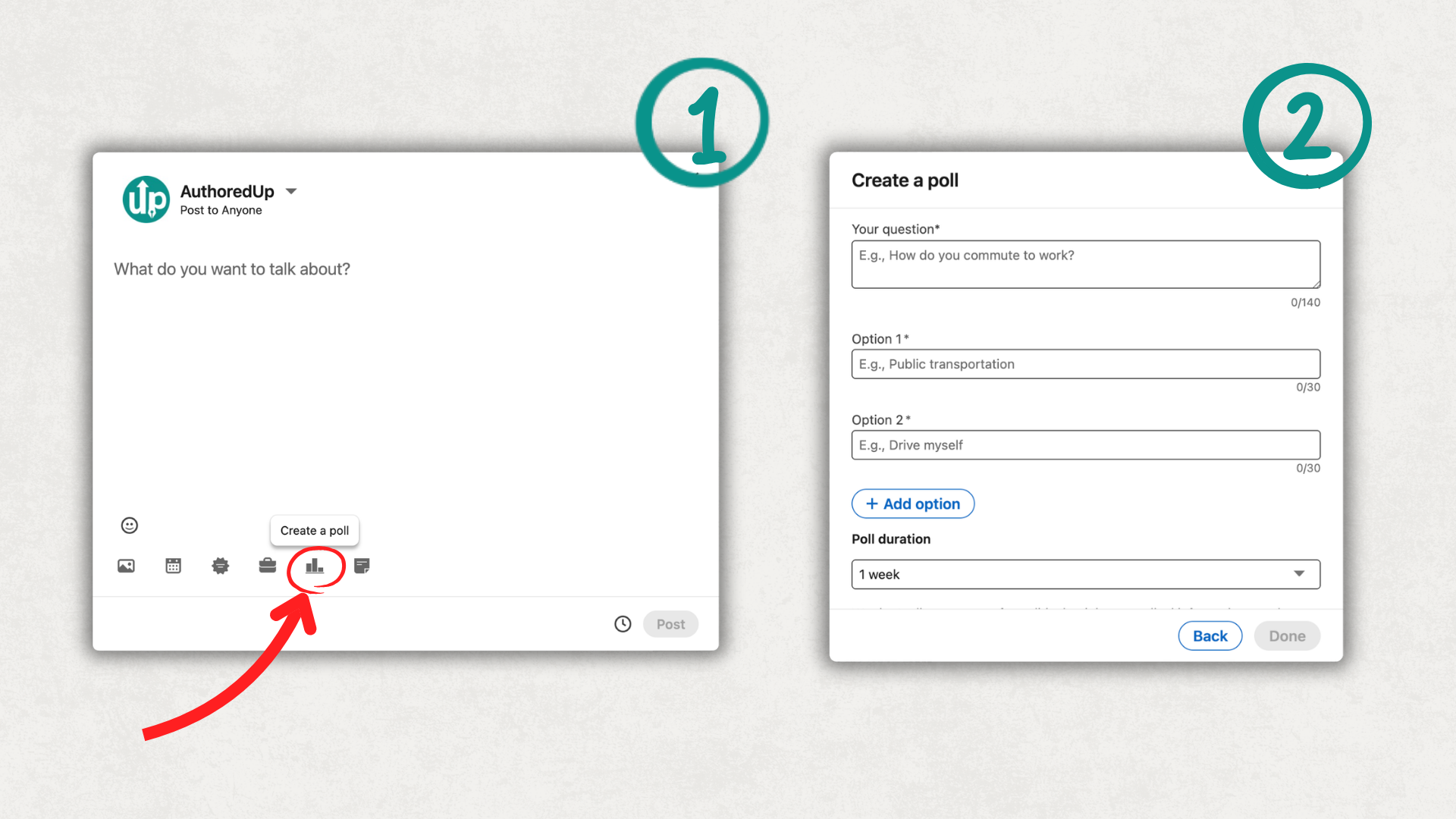
The steps are identical on mobile. Company pages can also create polls following the same process.
LinkedIn Poll Specs and Limits
The 30-character limit on answer options forces you to be concise. That's actually a feature, not a bug. Options like "Definitely, but only if the ROI justifies the time investment" won't fit. "Yes, if ROI is clear" will. Constraints sharpen your question.
Why LinkedIn Polls Still Work in 2026
The short answer: polls work because they create one-click engagement. Voting requires no writing, no vulnerability, and no time commitment. For the reader, it's the lowest-friction interaction on LinkedIn.
For the algorithm, a poll vote counts as an engagement signal. When 50 people vote on your poll in the first hour, LinkedIn reads that as "this content is resonating" and pushes it to more feeds. That's why polls consistently deliver the highest reach multiplier on the platform.
Here's how polls compare to other formats for personal profiles, based on AuthoredUp's analysis:
Source: AuthoredUp analysis of LinkedIn personal profile posts, Mar 2025 -- Feb 2026. Reach multiplier is relative to the profile's median reach across all formats.
Notice the pattern: polls have the highest reach but the lowest absolute engagement. A vote counts as one interaction. A carousel might generate likes, comments, saves, and shares. That's why we call polls a "reach amplifier, not an engagement driver." They're best used as part of a broader content mix, not as your primary format. For a complete breakdown of how each format performs, see our analysis of best-performing content on LinkedIn.
The quality filter matters more now. LinkedIn's algorithm updates in 2024-2025 increasingly penalized low-effort engagement bait, including lazy polls. "Coffee or tea?" polls used to work. They don't anymore. The LinkedIn algorithm now weighs dwell time and comment quality, which means your poll question needs to be genuinely interesting to your professional audience.
Among top 5% profiles, poll usage dropped from 1.23% to 0.71% of content year-over-year. Top creators are posting fewer polls, but the polls they do post are reaching +58% more people. Quality over quantity is winning.
12 LinkedIn Poll Ideas That Actually Get Results
Not all poll questions are equal. The best polls are specific to your niche, provoke genuine curiosity, and give you information you can use. Here are 12 templates organized by goal.
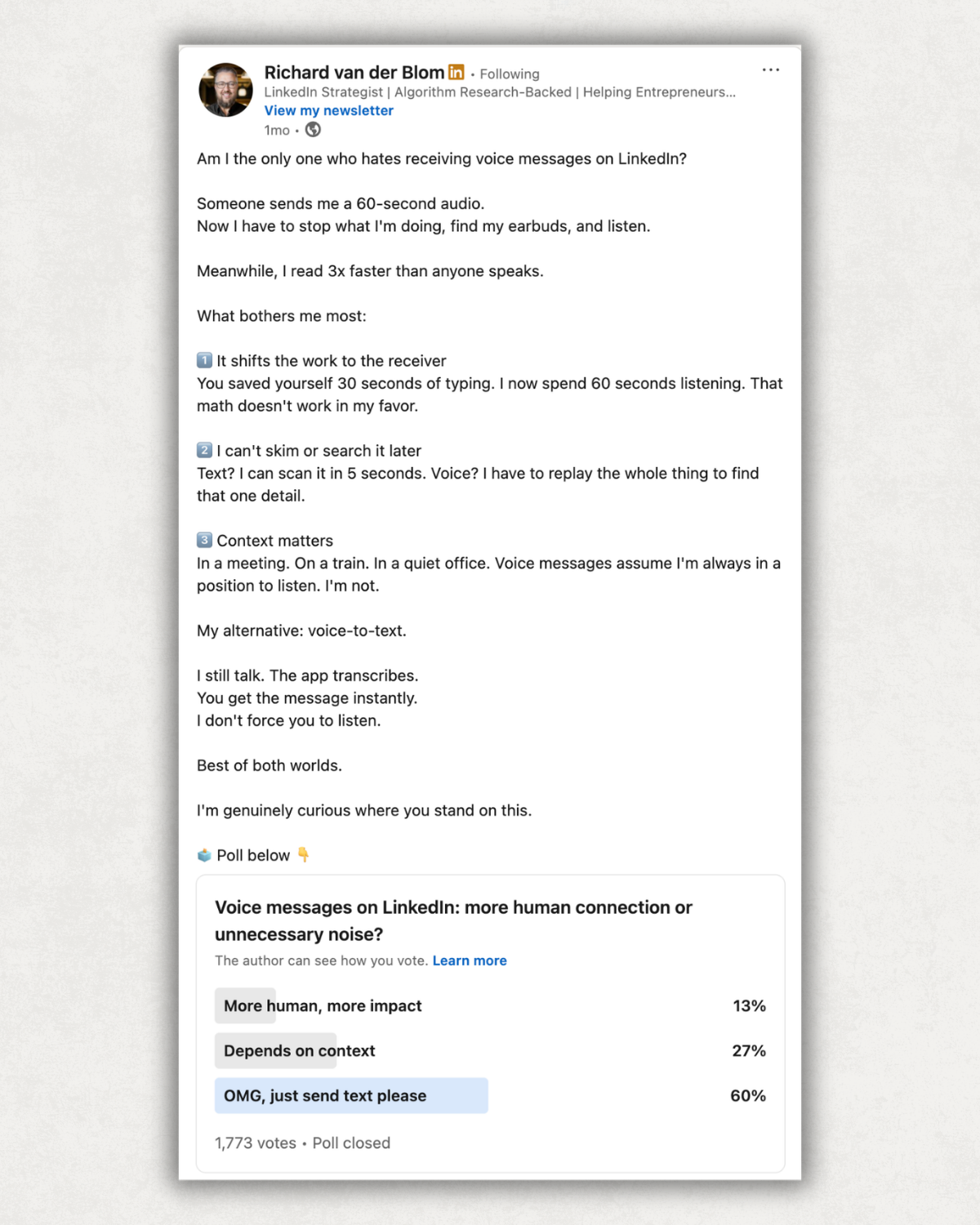
Polls for Audience Research
These polls help you understand what your audience wants, so you can create better content and offers.
1. "What's your biggest challenge with [your topic]?"
Options: 4 specific challenges you've heard from your audience. This tells you what content to create next and what problems to solve.
2. "How much time do you spend on [activity] per week?"
Options: Time brackets (Under 1 hour / 1-3 hours / 3-5 hours / 5+ hours). The results give you a data point for future content.
3. "Which tool do you use for [task]?"
Options: 3-4 popular tools in your space. Reveals market share and lets you tailor advice to the tools your audience actually uses.
Polls for Thought Leadership
These position you as someone with a point of view, not just a content curator.
4. "Hot take: [specific claim]. Agree or disagree?"
Options: Strongly agree / Somewhat agree / Disagree / It depends (comment). The "comment" option is key -- it pulls people into a discussion.
5. "Most underrated [skill/strategy] in [your industry]?"
Options: 4 specific, debatable choices. The engagement comes from people defending their pick in the comments.
6. "Which 2026 trend will have the biggest impact on [field]?"
Options: 4 current trends. Timely, forward-looking, and gives you a hook for a follow-up post with your analysis.
Polls for Community Building
These create a sense of belonging and recurring engagement patterns.
7. "Monday check-in: What's your priority this week?"
Options: Work categories relevant to your niche. Simple, low-stakes, builds a habit of engagement.
8. "One thing you wish you'd known earlier in your career?"
Options: 4 common lessons. Universal enough to get broad participation, specific enough to spark stories in the comments.
9. "I want to hear from you: [complex question]. Share in the comments."
Options: Use "Option A / Option B / Option C / Other (comment)." The poll is just the entry point -- the real content is the comment thread.
Polls for Lead Generation
These surface buying intent and content demand.
10. "What type of content would you find most valuable from me?"
Options: Content formats you're considering (video series / weekly newsletter / templates / live Q&A). Lets your audience choose your next product.
11. "If I created a [free resource], which topic would you want?"
Options: 4 topics you could realistically produce. The winner becomes your lead magnet, pre-validated by your audience.
12. "What's stopping you from [desired outcome]?"
Options: Common blockers you've identified. Each option maps to a service, product, or piece of content you offer.
LinkedIn Poll Best Practices
Write the post text first, poll question second
Most people skip the text above the poll. That's a mistake. The post text is where you add context, explain why you're asking, and give people a reason to care about the question. A poll with 3 lines of context outperforms an identical poll with no context.
Use all 4 options when possible
More options mean more people find an answer that fits. Two options (yes/no) kill discussion because there's nothing to debate.
Avoid yes/no questions entirely
"Do you use LinkedIn for business?" gets votes but zero comments. "How do you primarily use LinkedIn?" with 4 specific options gets votes AND a comment thread.
The 3-day duration is the sweet spot
One day feels rushed. Two weeks loses urgency. Three days to one week creates enough time for the algorithm to distribute the post while maintaining a "vote before it closes" motivation.
Respond to every comment in the first 2 hours
The algorithm watches early engagement closely. Your replies to voters who comment trigger notifications that bring them back, which creates a secondary engagement wave that boosts reach.
Don't post polls too often
Once or twice a month is ideal. Polls should feel like an event, not a routine. If every third post is a poll, your audience stops engaging with them. Plan your poll cadence as part of your broader LinkedIn content calendar.
Always follow up with results
When the poll closes, share the results as a separate post with your analysis. "I asked 500 of you [question]. Here's what happened..." These follow-up posts often outperform the poll itself because they contain original insight.

Common LinkedIn Poll Mistakes
Generic questions
"What do you think about AI?" is too broad. "Which AI task saves your team the most hours per week?" is specific, relevant, and gives you usable data.
Leading questions that push a specific answer
"Don't you agree that [your opinion] is the best approach?" isn't a poll. It's a statement dressed as a question. People see through it.
Missing the "Other" option
When the question is genuinely open-ended, always include "Other (comment below)" as the 4th option. It channels people who don't fit your options into the comment section instead of scrolling past.
Not tracking results
If you don't know which poll topics drive the most votes, comments, and profile visits, you're guessing. Track your poll performance alongside your other content in AuthoredUp's analytics to see how polls compare to your text posts, carousels, and images.
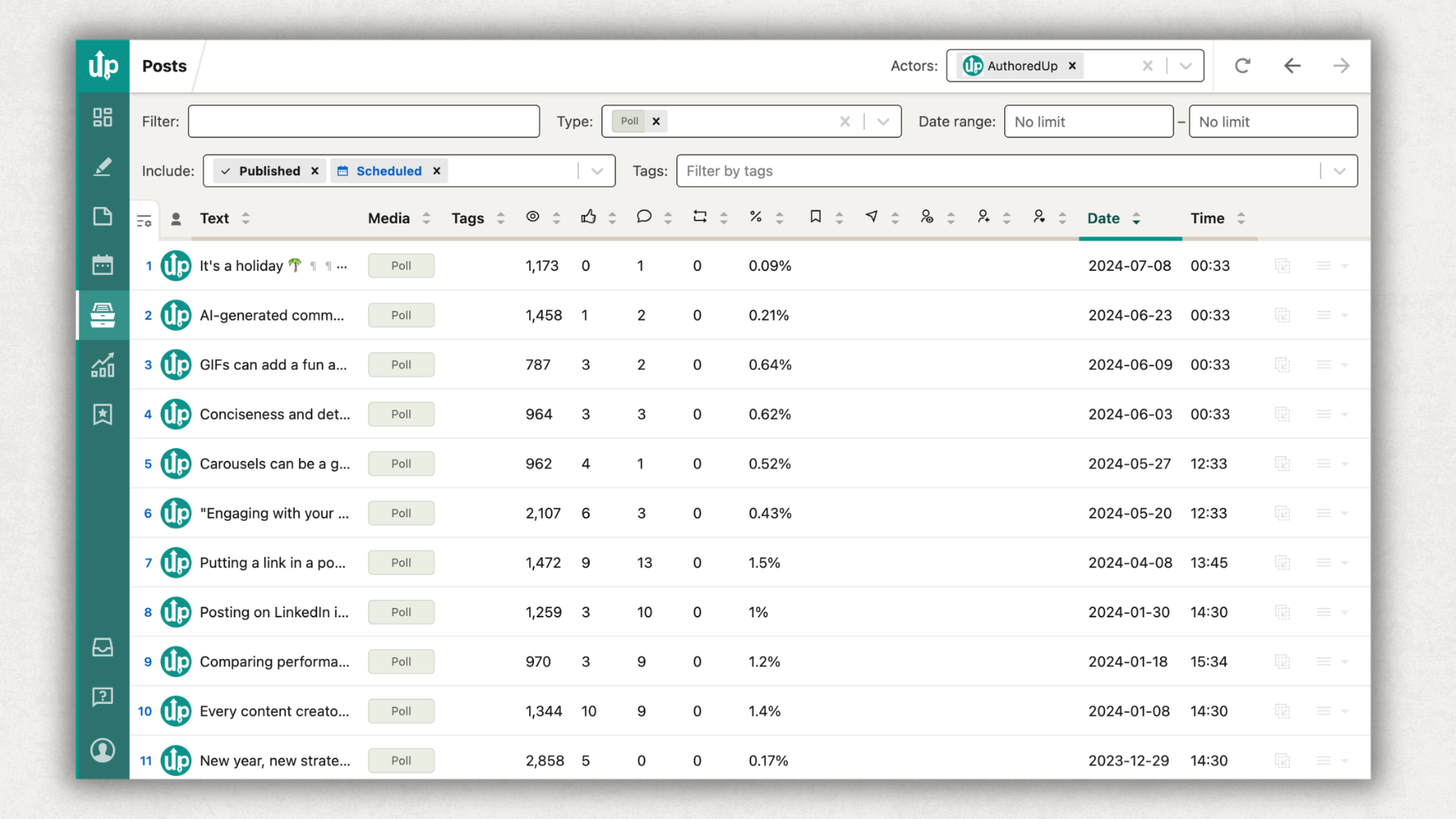
Using polls as your primary content format. The data is clear: polls generate reach, not deep engagement. They work best when 5-10% of your monthly content, mixed in with text posts, carousels, and other types of content on LinkedIn.
How to Turn Poll Results Into More Content
A poll isn't one piece of content. It's a content engine.
Share the results as a follow-up post
"I asked 847 of you which trend will have the biggest impact on [field]. The results surprised me." Add your analysis, what you expected vs. what happened, and what it means. These posts carry built-in curiosity because your audience already participated.
Let poll data set your content calendar
If your audience voted overwhelmingly for one topic, that's a signal. Write a deep-dive article, record a video, or create a carousel expanding on what they asked for. You can use LinkedIn post templates to quickly turn your poll topic into different content formats.
Turn surprising results into thought leadership
When a poll result contradicts conventional wisdom, you've found gold. "73% of you said [unexpected answer]. Here's why I think that is..." positions you as someone who listens and has something to say.
Use comments for warm outreach
Voters who commented with detailed responses are already engaged with your topic. A thoughtful DM referencing their comment isn't cold outreach -- it's continuing a conversation.
Build a content series
Run a monthly poll on a consistent theme. Over time, you build trend data: "In January, 60% said X. By June, only 35% said X. Here's what changed." This kind of longitudinal data is rare on LinkedIn and positions you as someone tracking real patterns.
Plan your poll-to-content pipeline as part of your broader LinkedIn content strategy. Polls generate ideas. Strategy turns ideas into a system.
FAQs
Can you see who voted on a LinkedIn poll?
Yes. As the poll creator, you can see every individual voter and which option they selected. This is useful for audience research and targeted follow-ups. Voters can also see total vote counts but cannot see other individual voters' choices.
Can you edit a LinkedIn poll after posting?
No. Once published, a poll cannot be edited. If you spot a typo or want to change an option, you'll need to delete the post and create a new one. Double-check your question and options before hitting Post.
Do LinkedIn polls work on Company Pages?
Yes. Company Pages can create polls using the same steps as personal profiles. However, company page polls typically see lower engagement rates. AuthoredUp's data shows company page polls reach 1.24x median (vs 1.78x for personal profiles), and engagement is even lower.
What's the maximum number of poll options on LinkedIn?
Four. You can add between 2 and 4 answer options, each with a 30-character maximum. If your question needs more than 4 options, consider including "Other (comment below)" as the 4th and directing people to the comments.
Can you create LinkedIn polls on mobile?
Yes. The poll creation flow is the same on the LinkedIn mobile app. Tap "Post," then the "+" icon, then "Create a poll." The same character limits and duration options apply.
How often should you post LinkedIn polls?
Once or twice per month is the sweet spot. Polls should be 5-10% of your total content mix. Posting polls more frequently dilutes their impact and can feel repetitive to your audience. For guidance on overall posting frequency, see our research on how often to post on LinkedIn.
Are LinkedIn polls still effective in 2026?
Yes, but the bar is higher. LinkedIn's algorithm updates have penalized low-effort polls (yes/no questions, irrelevant topics). Polls that ask specific, professional questions still deliver the highest reach of any format. The key shift: fewer polls, better questions. Top creators reduced poll usage by 42% year-over-year while seeing 58% more reach per poll.
What to Do Next
Polls are a reach tool, not an engagement strategy. Use them to expand visibility, test ideas, and learn what your audience cares about. Then turn those insights into the deeper content -- text posts, carousels, articles -- that builds real relationships.
Start with one well-crafted poll this month. Make the question specific to your niche. Use all 4 options. Write context above the poll. Engage with every comment. Then share the results as a follow-up post.
Plan your poll alongside the rest of your content with AuthoredUp's content calendar and scheduling tools. When you can see your polls, text posts, and carousels mapped across the week, you'll find the right rhythm.
.svg)
.png)
.svg)
.png)
.png)
