


.svg)

.png)
Most lists of LinkedIn marketing tools are really lists of outreach automation. Connection senders, profile scrapers, bulk messagers. Tools that put your account at risk in exchange for a bump in reply rate.
This isn't that list.
Everything below is a tool you can run without gambling your account, sorted by the job it actually does: buying ads, publishing organic content, making the content itself, or measuring what happened.
One finding shaped how we ordered it. We looked at 481,623 LinkedIn posts published between September 2025 and February 2026, split by whether they came from a company page or a personal profile. The received wisdom is that company pages are dead and personal profiles carry everything. Our numbers say otherwise: company pages ran a median engagement rate of 2.60%, and personal profiles 2.38%.
Company pages are not the weak channel. They're the consistent one, with a tighter spread (1.63%–3.80% between the 25th and 75th percentile, against 1.32%–3.94% for profiles). Personal profiles have more upside and more downside.
[VISUAL 1 — bar chart, NEW: "Median engagement rate: company pages vs personal profiles". Two bars (company 2.60%, personal 2.38%) with the p25–p75 range shown as an error band on each (company 1.63–3.80, personal 1.32–3.94). Caption/alt: "AuthoredUp analysis of 481,623 LinkedIn posts, September 2025 – February 2026." Brand colours per authoredup-style-guide.md.]
That matters here because most tools in this category only handle one side. Hootsuite and Sprout Social do LinkedIn analytics for company pages and not for personal profiles. If you run both, and the numbers above say you probably should, the question isn't which tool is best. It's which tool covers you at all.
Quick comparison: all 10 tools
1. LinkedIn Campaign Manager
If your definition of "LinkedIn marketing" involves a budget, this is the tool, and no third party replaces it. Campaign Manager is where you set targeting, pick a format (Sponsored Content, Message Ads, Dynamic Ads, Text Ads), set budgets and read performance. Everything else in the paid ecosystem sits on top of it.
.png)
The targeting is the reason people accept the cost per click. You can filter by job title, seniority, company size, industry and skills with an accuracy no other network offers, because members maintain that data themselves for their own reasons.
The tool itself is free. What you pay is ad spend, and LinkedIn is expensive relative to other networks. Treat it as a channel decision rather than a tool decision.
Where it falls short is the reporting. The interface assumes you already know which numbers matter, and it stops at the click, so anything about what happened afterwards has to come from somewhere else.
2. LinkedIn Pages analytics
Before you buy anything, spend a month with what LinkedIn already gives you. Your company page already reports impressions, engagement, follower growth and audience demographics by job function, seniority, industry and location. For a lot of teams this is genuinely enough, and it costs nothing.
.png)
Two limits decide whether you outgrow it. First, the history is shallow, so year-over-year comparison is awkward. Second, it covers your page and not the people posting on behalf of your brand. If your employees are publishing, the native tools won't show you that half at all. And when you do want the numbers somewhere else, there's no export worth the name.
Start here. Buy something when you hit a wall you can name. We've written up what actually works on a company page if you want to get more out of the free version first.
3. AuthoredUp
This is ours, so read the specifics rather than the adjective.
Using AuthoredUp, you write and format inside LinkedIn through the Chrome extension, preview exactly how the post breaks across desktop and mobile before publishing, schedule it, and then read the analytics on the web platform.
The part that matters for the argument at the top of this page: company pages are included free and unlimited on every plan, and personal profiles are covered too. On most tools in this list, LinkedIn analytics means company pages only, or you pay per profile connected on both sides.
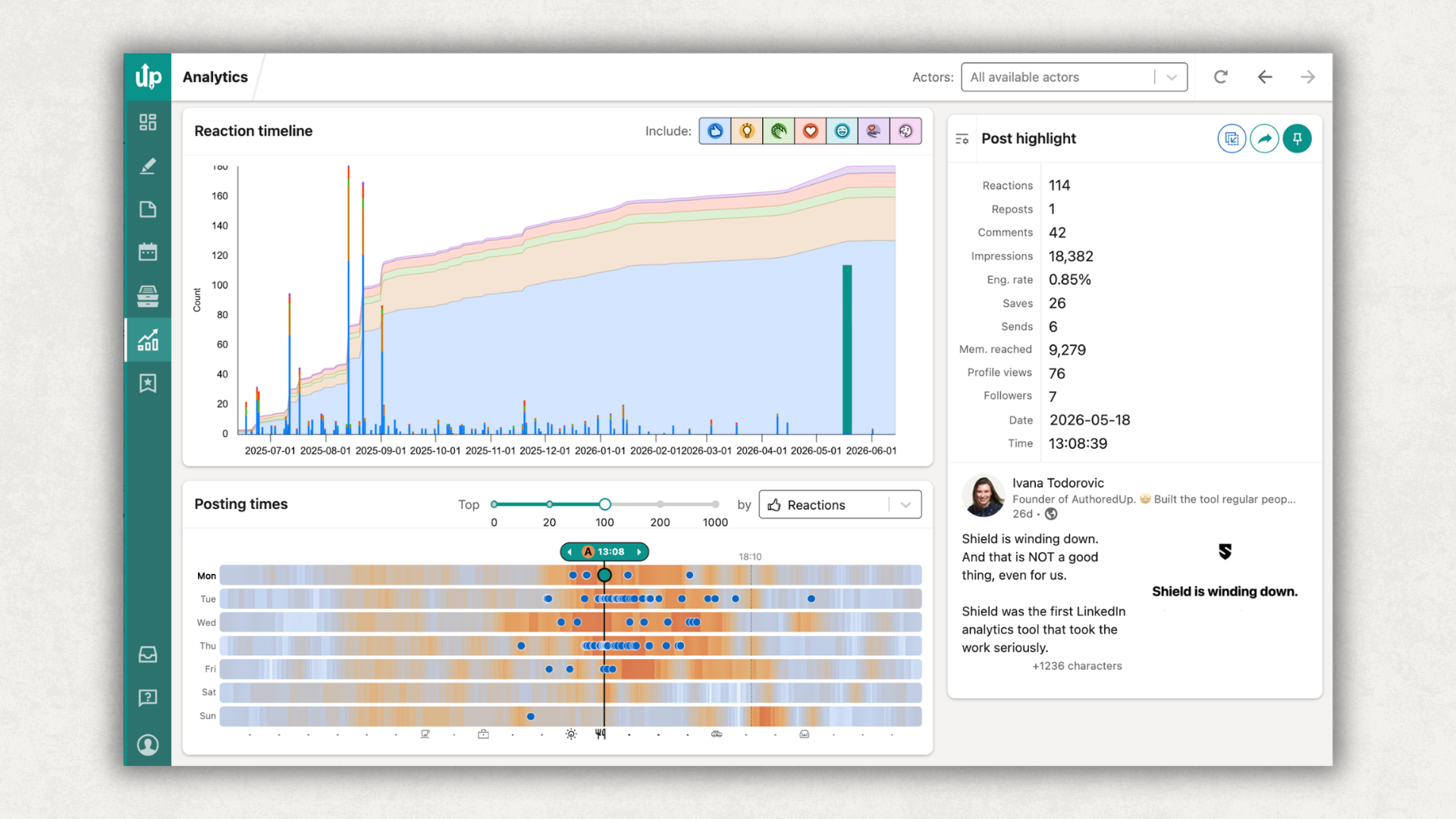
You can also import your LinkedIn GDPR data export and get years of post history on day one, instead of starting your analytics from the day you signed up. That single detail is why people switch from analytics-only tools.
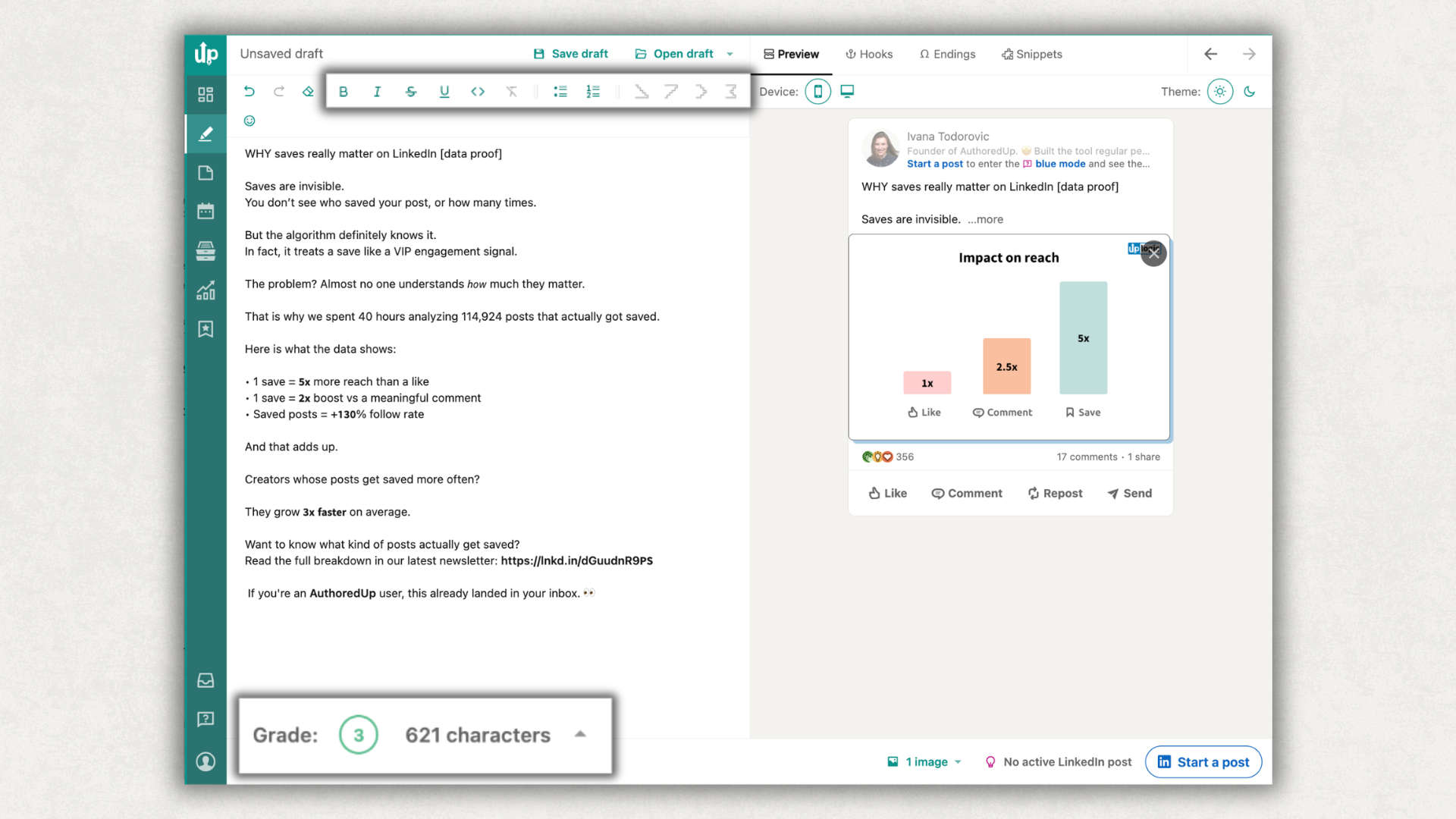
Pricing is $19.95/mo per connected profile, or $14.95/mo per member on Team. Fourteen-day trial, no card. Scheduling and publishing need the Chrome extension; drafts and analytics work in the browser.
If you want the wider category rather than the marketing slice, we've compared 13 LinkedIn creator tools and the analytics tools specifically elsewhere.
The obvious limit is scope. It's LinkedIn only, so if you want one dashboard covering five platforms, this isn't it.
4. HubSpot
Every other tool on this list tells you how a post performed. HubSpot tells you whether it turned into anything, which is why it belongs here for teams that have to justify the channel to someone else.
.png)
You manage LinkedIn ads inside HubSpot alongside Meta, Google and TikTok, build audiences from CRM data rather than from LinkedIn's targeting alone, and get attribution reporting that follows a click through to a contact and a deal.
For a B2B marketing team this closes the loop that LinkedIn's own reporting leaves open. Campaign Manager can tell you a campaign drove 400 clicks at a painful cost per click. It can't tell you that eleven of them became opportunities and two closed.
The pricing splits sharply. There's a genuinely free tier for up to 2 users, and Starter is $7/seat/mo. Then Professional jumps to $800/mo and Enterprise to $3,600/mo, and the attribution reporting people actually want HubSpot for lives in the upper tiers. Budget accordingly, or you'll sign up for Starter and find the reason you came isn't in it.
It's also a large system to adopt if LinkedIn is the only thing you need it for, and like the enterprise suites further down, it will tell you nothing about personal profiles.
5. Wispr Flow
A LinkedIn post is closer to speech than to writing, which is why so many drafts read stiffly. Wispr Flow is dictation for people who talk better than they type. You hold a key, talk, and it writes cleaned-up text with punctuation into whatever window you're in, including the LinkedIn composer. Over 100 languages.
.png)
It's the least obvious tool here and possibly the most useful. The hardest part of posting consistently isn't formatting or scheduling, it's producing the first draft. Talking through a client story for ninety seconds and editing the transcript is a different task from staring at an empty box.
Free tier with weekly word limits, Pro at $15/mo or $12/mo annual. Runs on Mac, Windows, iOS and Android.
Two caveats. Transcripts always need an edit, so this replaces the blank page rather than the writing. And dictating is awkward in an open-plan office.
Dictate the draft, then tidy the formatting with something built for it, our free text formatter handles bold, italics and bullets that paste straight into LinkedIn.
6. HeyGen
If video is the format you keep skipping because you don't have a camera, a crew or a second language, this removes most of that cost. HeyGen generates video from a script using stock or custom avatars, and dubs existing video into 175 languages with matched lip movement. For a B2B team that wants video on LinkedIn without booking studio time, or that needs the same product explainer in English, German and Portuguese, it removes most of the production cost.
.png)
Read the next part before you build a content plan on it. According to Algorithm Insights 2026 by Richard van der Blom, based on 1.3 million posts with AuthoredUp as research partner, fully AI-generated content loses 30–40% of its reach, LinkedIn detects it and discounts it.
That doesn't make HeyGen a bad buy. It makes it a production tool rather than a content strategy. Use it to localize a talk you actually gave, or to turn a post that already performed into video. The thinking and the script should still be yours, because the reach penalty lands on content that is generated end-to-end, not on content that was merely edited with software.
Free tier gives 3 videos a month at up to a minute. Creator is $29/mo ($24 annual), Pro $49/mo, Business from $149/mo plus per seat.
The dubbing is genuinely good. The avatars still read as avatars to a lot of audiences, so test one on your own feed before you commit a quarter of your content to them.
7. Canva
Carousels remain one of the strongest-performing formats on LinkedIn, and Canva is the shortest path to making one that doesn't look improvised. Templates sized for LinkedIn, brand kits so colours stay consistent, and PDF export, which is the format LinkedIn wants for document posts.
.png)
The free plan genuinely covers carousel creation. Paid tiers add premium templates, brand kits and background removal.
It's a design tool and nothing more, so don't expect scheduling or analytics worth using for this channel.
Design your carousel here, export as PDF, then upload it as a document post rather than an image.
8. SocialPilot
SocialPilot sits in the gap between free schedulers and the enterprise suites, which makes it the sensible pick for a small team that wants approvals and bulk scheduling without signing an enterprise contract.
.png)
Essentials is $20/mo ($17 annual) for 5 accounts and 1 user; Standard $40/mo; Premium $100/mo. No free plan, but a 14-day trial with no card.
First-comment scheduling is on every plan, which is unusual at this price. Bulk scheduling and CSV upload only appear on Standard and above, so check which tier your workflow actually needs before signing up for Essentials.
LinkedIn is one network among many here rather than the focus, so the LinkedIn-specific depth is shallower than a dedicated tool gives you. It does cover both profiles and pages, which several pricier options don't.
9. Sprout Social
Sprout is a full social suite: publishing, listening, reporting, inbox and approval workflows across networks. If you have stakeholders who need a monthly deck and a compliance process, this is the category it belongs to.
.png)
Be precise about the price, because a lot of roundups aren't. Every tier is per seat. Essentials is $99/seat/mo billed monthly, $79/seat/mo annual, for 5 profiles. Standard is $199/seat/mo, Professional $299, Advanced $399. A three-person team on Standard is roughly $600 a month.
For LinkedIn specifically it reads company pages, not personal profiles. Our Sprout Social comparison covers where that line falls.
The reporting depth and the approval workflows are real, and so is the per-seat arithmetic. For most LinkedIn-first teams this is more tool than the job needs.
10. Hootsuite
Hootsuite is the longest-standing tool here and has restructured its pricing more than once. It earns its place for large operations already running many networks and many accounts.
.png)
Current plans start at $99/mo for Standard (10 social accounts), $199/mo for Professional (unlimited accounts), up to $399/mo for Advanced, on annual billing. There's a 14-day trial, with daily posting limits during it.
The case for Hootsuite is breadth: many networks, many accounts, one interface, plus listening and analytics modules. The case against, for a LinkedIn-focused team, is that you pay for that breadth whether you use it or not. LinkedIn analytics again means company pages.
What happened to Shield Analytics
If you've seen Shield recommended in older lists, it's winding down. It was the default personal-profile analytics tool for years, so a lot of roundups still carry it. If you're on it and need somewhere to go, we wrote a migration guide that covers getting your history out.
Does scheduling cost you reach?
This is the objection that stops marketing teams using scheduling tools at all, so it's worth settling with numbers rather than opinion.
We compared 300,994 posts by how they were published. Median engagement rate, scheduled against manual:
The gap never reaches a tenth of a percentage point in either direction, and it doesn't point one way. Scheduling does not suppress engagement.
Median impressions are a slightly different story. Scheduled text-only posts landed at 731 against 882 for manual, while scheduled video came out ahead. Mixed, format-dependent, and nothing like the penalty the folklore describes.
LinkedIn's own scheduler covers the basics free: you can schedule a post from ten minutes to three months ahead, and edit it afterwards, which a lot of competitor articles still claim you can't. What it won't do is bulk uploads, queues, first comments or best-time suggestions.
Use the scheduler. Just don't schedule and disappear: the engagement in the first hour is yours to earn either way. If you want the mechanics, we've covered how to schedule LinkedIn posts step by step.
Which LinkedIn marketing tool should you pick?
Work down this list and stop at the first line that describes you.
- You're running paid campaigns. Campaign Manager, plus something else for organic. It isn't optional and nothing replaces it.
- You haven't bought anything yet. LinkedIn Pages analytics for a month first. Name the wall you hit before you spend.
- You publish organic content and want to know what worked. AuthoredUp, particularly if you run company pages and personal profiles together, since pages are free and unlimited.
- You need to prove LinkedIn drives revenue. HubSpot, budgeted at Professional rather than Starter, because that's where the attribution lives.
- Your bottleneck is producing the content at all. Wispr Flow if it's the writing, HeyGen if it's video, Canva if it's visuals. All three have real free tiers, so test before paying.
- LinkedIn is one of five networks you post to. SocialPilot if you're small, Hootsuite or Sprout Social if procurement is involved.
The one combination we'd avoid: an enterprise suite bought purely for LinkedIn. You'll pay four figures a year for company-page reporting and still have nothing on the profiles doing the work.
Frequently asked questions
What are the best tools for LinkedIn marketing?
It depends on the job. For paid campaigns, LinkedIn Campaign Manager. For writing and analyzing organic posts, AuthoredUp. For proving what LinkedIn contributed to pipeline, HubSpot. For producing the content itself, Wispr Flow, HeyGen and Canva. For scheduling across networks, SocialPilot, Hootsuite or Sprout Social. Most teams end up with two or three, not one.
How do you do LinkedIn marketing for free?
LinkedIn's own Pages analytics, post scheduling and Campaign Manager all cost nothing to use. Add Canva's free plan for visuals, HeyGen's free tier for a few videos a month, and Wispr Flow's free dictation. You can run a competent LinkedIn presence at zero software cost. What you can't get free is deep historical analytics, personal-profile reporting or attribution.
Do scheduled LinkedIn posts get less reach?
No. Across 300,994 posts we measured, median engagement rate for scheduled and manually published posts differs by less than a tenth of a percentage point in every format, and the direction isn't consistent. Median impressions vary by format but show no systematic penalty.
Should I market on a company page or a personal profile?
Both, and the gap is smaller than the usual advice suggests. Across 481,623 posts from September 2025 to February 2026, company pages ran a median engagement rate of 2.60% against 2.38% for personal profiles. Profiles have a wider spread, so more upside and more downside. Pick tools that cover both rather than committing to one.
Does AI-generated content still work on LinkedIn?
Not on its own. Algorithm Insights 2026, based on 1.3 million posts with AuthoredUp as research partner, found fully AI-generated content loses 30–40% of its reach. Tools like HeyGen are worth using for production — filming, translation, repurposing — rather than for generating posts end to end.
Do I need a separate tool for company pages?
Often, yes. Hootsuite and Sprout Social report on company pages and not personal profiles. SocialPilot and AuthoredUp cover both, and on AuthoredUp company pages are included free and unlimited. Check this before you buy, because it's the limitation people discover last.
How do I use LinkedIn as a marketing tool?
Publish consistently from both your company page and the profiles of people willing to post, measure which formats and hooks actually perform for your audience rather than copying general advice, and put paid budget behind the organic posts that already proved themselves. Our data on what performs best on LinkedIn breaks down format by format.
.svg)
.png)

.svg)
.png)
.png)