


.svg)

.png)
LinkedIn's post editor gives you a text box. No formatting. No bold, no bullets, no way to preview what your post will look like before it goes live. One draft at a time, and it disappears the moment you switch accounts.
Every post you publish is a small gamble. Did the hook land? Did the formatting break mid-sentence? Was the "see more" cutoff in the wrong place? You find out when it's already live, and already being served to your network.
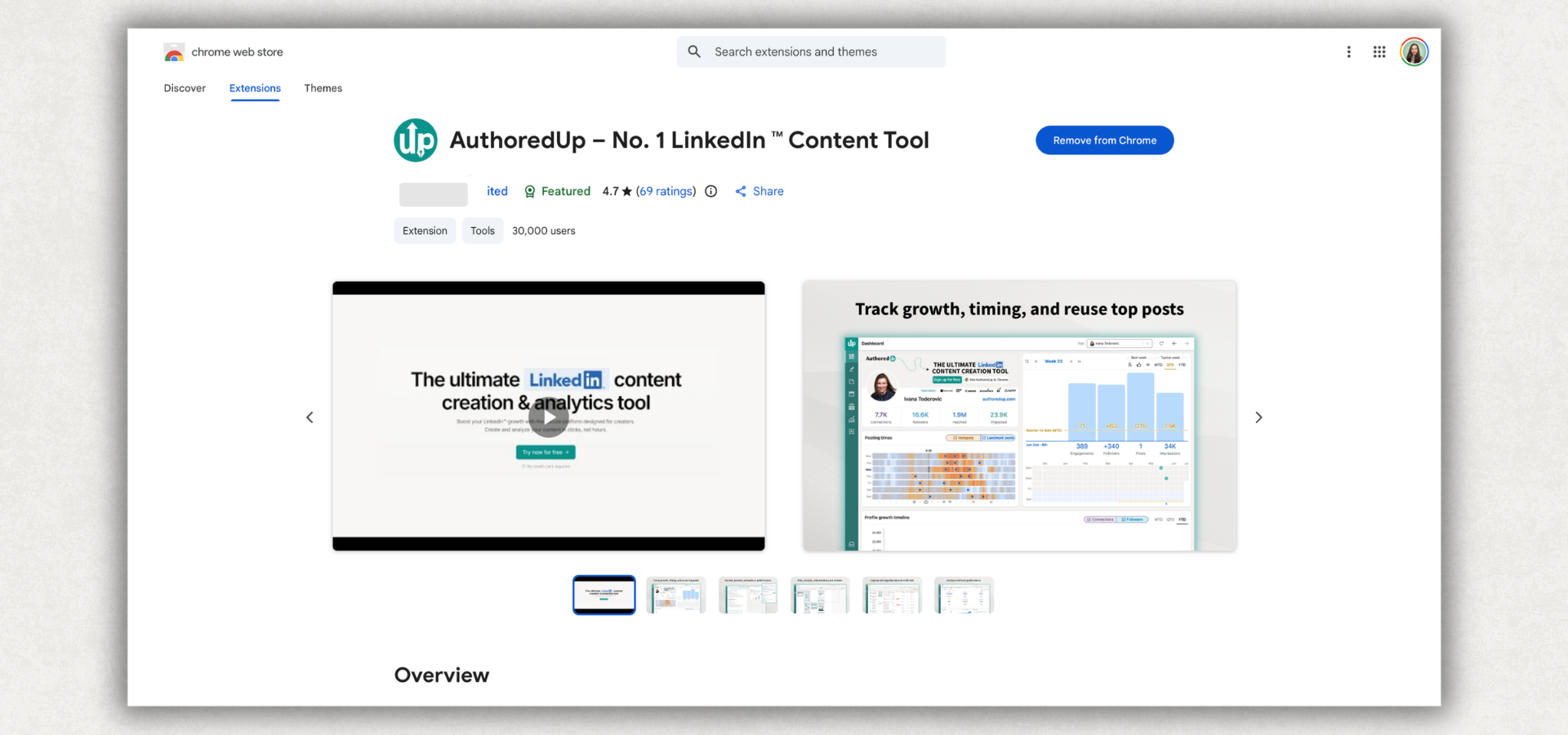
AuthoredUp's Chrome extension closes that gap. It installs in your browser and layers directly over LinkedIn's interface, turning it into a proper content workspace: rich text editor, hooks library, post preview, draft manager, scheduler, and deep analytics, all without leaving the LinkedIn tab.
The extension is rated 4.8/5 on the Chrome Web Store with 68+ reviews. Content teams at Microsoft, SAP, Canon, and EY use it for their LinkedIn publishing workflow.
What Is the AuthoredUp Chrome Extension?
AuthoredUp is a LinkedIn Chrome extension for content creation, formatting, preview, scheduling, and analytics. It installs in Chrome and overlays on LinkedIn's native interface, so you write in LinkedIn with AuthoredUp's tools active alongside you.
It's not a separate app you tab over to. The extension is there when you open the post editor, adding tools LinkedIn doesn't give you: a text formatter, a library of hooks and CTAs, a live preview of how your post will render, and a draft system that isn't wiped every time you switch profiles.
The extension is currently Chrome-only. Publishing and scheduling require it to be active. The web platform at platform.authoredup.com is accessible from any browser without the extension. That covers drafts, analytics, and the content calendar.

What You Can Do With It
Format posts the way LinkedIn doesn't let you
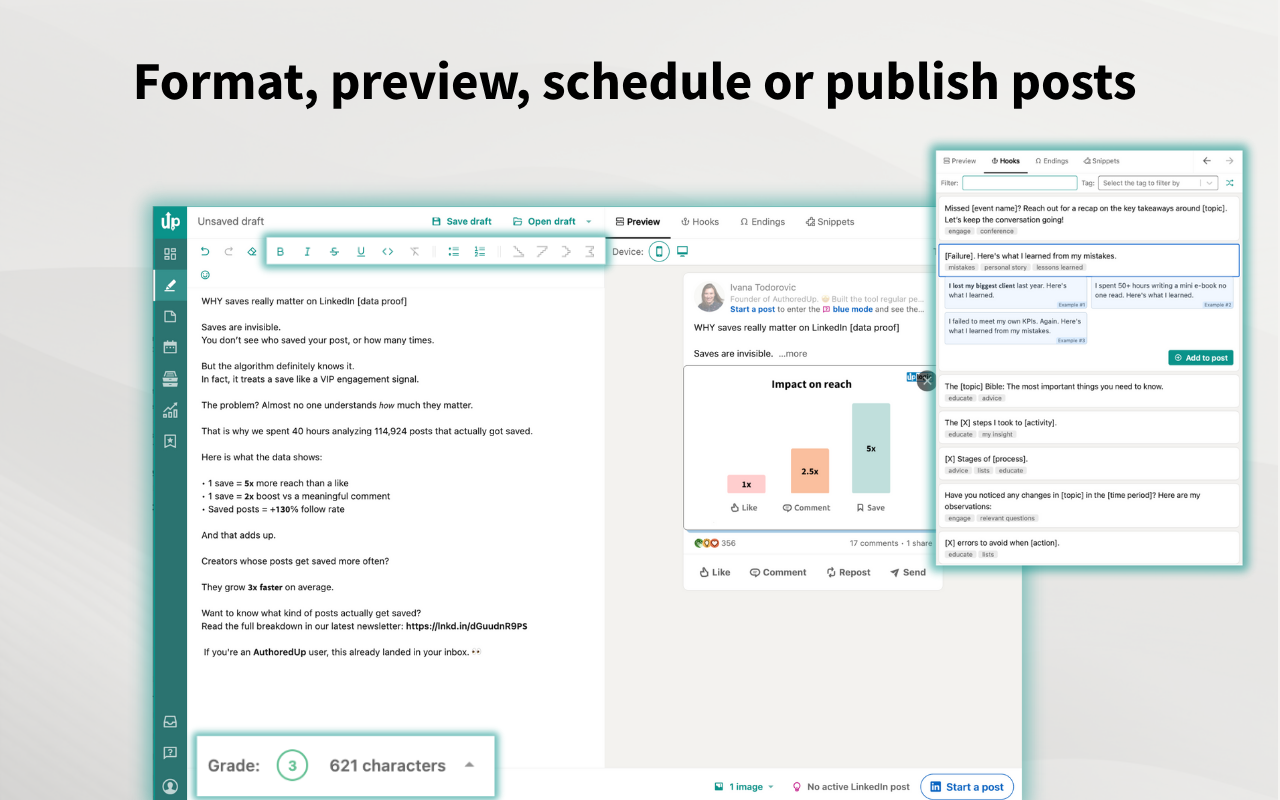
LinkedIn's native editor has no formatting controls. AuthoredUp injects them directly into the interface:
- Bold and italic through Unicode conversion (works across LinkedIn's rendering)
- Bullet points and visual separators
- Emoji picker built in
- Readability score that shows you how dense the post is before it's live
You can see exactly how formatting will render as you write. No surprises when it publishes. Our guide to formatting your LinkedIn posts for readability covers the techniques in more detail.
Preview before publishing
LinkedIn shows you nothing before you publish. AuthoredUp adds a live preview panel that renders exactly how the post will look: formatted characters, line breaks, emoji rendering, and the "see more" cutoff point. What you see in the preview is what your followers will see.
This catches formatting issues that aren't obvious in the editor: stacked line breaks, unicode characters that render oddly, hooks that get cut off mid-sentence. Here's more on how to preview your posts before publishing.
Manage multiple drafts
LinkedIn gives you one draft slot. Multiple posts in progress? Ideas at different stages, posts for different accounts? They overwrite each other.
AuthoredUp replaces that with a real draft system: unlimited drafts, organized and searchable, with the ability to annotate ideas, export for backup, and share with clients or teammates for review. You can switch between drafts without losing anything. Here's a closer look at LinkedIn's built-in single draft limit and how to work around it.
Schedule posts
Scheduling in AuthoredUp requires the extension to be active with LinkedIn open in Chrome. It uses LinkedIn's native publishing mechanism, not automation. Your account isn't doing anything different from what it would do if you clicked "Post" manually at that exact time. No data is scraped. No auto-engagement happens. Just timed publishing.
The visual content calendar shows all scheduled and published posts across your personal profiles and company pages in one view, making it straightforward to manage posting cadence without a spreadsheet.

Track analytics that go back years
Most LinkedIn analytics tools only show data from the day you signed up. AuthoredUp's archive import changes that. Upload your LinkedIn GDPR data export and AuthoredUp loads your full post history instantly, going back however many years you've been active on the platform.
From there: impressions per post, engagement rate over time, follower growth trends, side-by-side post comparisons, reaction breakdowns, and correlation plots between post format and performance. It's the LinkedIn analytics layer LinkedIn's own dashboard doesn't provide.

Company pages: unlimited and free
AuthoredUp supports unlimited company pages per account at no additional cost. The full feature set works for company pages exactly the same as personal profiles: editor, formatting, preview, scheduling, analytics, and drafts.
Most competing tools treat company pages as a paid add-on or leave them out entirely. AuthoredUp includes them because the workflow problem is the same: posting as yourself or posting on behalf of a company runs through the same editor, the same scheduler, the same analytics.
How It Works Inside LinkedIn
The extension overlays on LinkedIn's interface. You don't get redirected to a separate app when you write.
- Go to the Chrome Web Store and install AuthoredUp
- Open LinkedIn in Chrome
- Click to create a post - AuthoredUp's toolbar appears below the text editor
- Write, format, run a preview check, or pull from your hooks and CTA libraries
- Publish now or schedule for a specific time directly from the LinkedIn interface
The web platform at platform.authoredup.com handles drafts, analytics, and the content calendar. When you're ready to publish or schedule, the extension takes over.
How AuthoredUp Compares to Other LinkedIn Chrome Extensions
LinkedIn Chrome extensions broadly split into three categories: automation tools (which can get accounts flagged), lead generation tools (sales-focused, not content-focused), and content creation tools. AuthoredUp is in the third category, the only one that covers the full posting workflow.
A few things stand out in this table.
The price gap is significant. Taplio and Kleo start at $49/month, three to four times AuthoredUp's starting price, for comparable content creation features and less analytics depth.
The account safety point matters more than it looks in a table. Taplio's platform includes engagement automation features (auto-likes, connection sequencing) that fall into territory LinkedIn's User Agreement explicitly prohibits. AuthoredUp uses LinkedIn's native publishing mechanism throughout. The extension reads nothing it doesn't need to render, and sends nothing LinkedIn doesn't process through its own publishing flow.
The archive import feature is genuinely unique. No other tool in this comparison lets you load years of historical post data. If you've been on LinkedIn for five years and want to understand what worked in year one versus now, Shield and Taplio can't help. They only have data from the day you connected your account.
For a broader view of what's available across LinkedIn tool categories, the roundup of the best LinkedIn Chrome extensions covers lead generation, prospecting, and other extension types that fall outside AuthoredUp's scope.
Who Is It For?
AuthoredUp is built for people who publish content on LinkedIn regularly and want more control over the process. More specifically:
B2B marketers and consultants who manage their own profiles plus client or company accounts. Multiple profiles, multiple pages, analytics per account, and one subscription instead of per-profile pricing on expensive platforms.
Founders doing thought leadership who write their own posts and want their content to actually perform. Not AI writing for them. Better tools to write faster and see what works.
Tech professionals and recruiters building a personal brand who post weekly or more and want to understand why some posts land and others don't.
Corporate influencers and employee advocacy teams who need scheduling coordination, consistent formatting across multiple authors, and analytics to report on content performance. See our roundup of the best LinkedIn tools for content creators.
It's not the right tool if you want AI to generate posts for you from scratch, if you need cross-platform scheduling (Twitter/X, Instagram, etc.), or if you're primarily a recruiter looking for lead generation and prospecting tools. AuthoredUp's focus is content quality and performance on LinkedIn specifically.
If you write your own content and want to do it better, with data to back up your decisions, that's what AuthoredUp is designed for. LinkedIn officially encourages creators to track and analyze their content through its creator resources, and AuthoredUp provides the depth to actually act on that data.
The free LinkedIn text formatter is a good way to test the formatting features without committing to a trial.
Frequently Asked Questions
Does AuthoredUp have a Chrome extension?
Yes. AuthoredUp is primarily a Chrome extension that installs in your browser and works inside LinkedIn's native interface. It adds formatting tools, a hooks library, post preview, draft management, and scheduling without requiring you to leave LinkedIn. The companion web platform at platform.authoredup.com handles analytics and drafts from any browser.
Is AuthoredUp free?
AuthoredUp offers a 14-day free trial with full access to all features. No credit card required to start. After the trial, plans start at $14/month per LinkedIn profile connected. Company pages are always free and unlimited on any plan.
Does AuthoredUp work on Firefox or other browsers?
Currently, AuthoredUp is Chrome-only for the browser extension. The web platform at platform.authoredup.com works in any browser and covers drafts, analytics, and the content calendar. Publishing and scheduling require the Chrome extension.
Is it safe to use a Chrome extension on LinkedIn?
AuthoredUp is designed specifically to be LinkedIn ToS compliant. It doesn't scrape data, doesn't auto-engage on your behalf, and doesn't use automation sequences. It publishes posts using LinkedIn's native mechanism, the same way you'd click "Post" manually. The risk that exists with automation tools (auto-likes, auto-connects, data scraping) doesn't apply here.
Can I use AuthoredUp without the Chrome extension?
You can access drafts, analytics, and the content calendar from platform.authoredup.com without the extension installed. To publish or schedule posts, you need the Chrome extension active with LinkedIn open in your Chrome browser.
Does AuthoredUp work for company pages?
Yes. Company pages are supported with the same full feature set as personal profiles: formatting, preview, drafts, scheduling, analytics, and archive import. Unlimited company pages are included at no extra cost on every plan.
.svg)
.png)

.svg)
.png)
.png)