


.svg)

.png)
LinkedIn gives you two ways to publish: posts and articles. Most creators default to posts. Some swear by articles. Few use both well.
Here's the difference that matters: posts show directly in the feed. Articles require a click. That single difference explains almost everything about how the two formats perform.
We looked at format performance data from March 2025 through February 2026 to see how articles actually stack up against posts. The numbers tell a clear story, but the answer isn't "always pick one."
LinkedIn Articles vs Posts: Key Differences
This table covers the structural differences. But the real question is: which one gets results?
The Performance Gap: What the Data Shows
Articles and posts serve different purposes, and the engagement data reflects that.
From AuthoredUp's analysis of content format performance (March 2025 through February 2026, personal profiles):
Articles reach a median of 596 people. Text posts reach 921. Image posts reach 1,031. Documents reach 1,198.
For engagement, the gap is wider. Articles generate a median of 12 engagements versus 21 for text posts, 36 for images, and 35 for document/carousel posts.
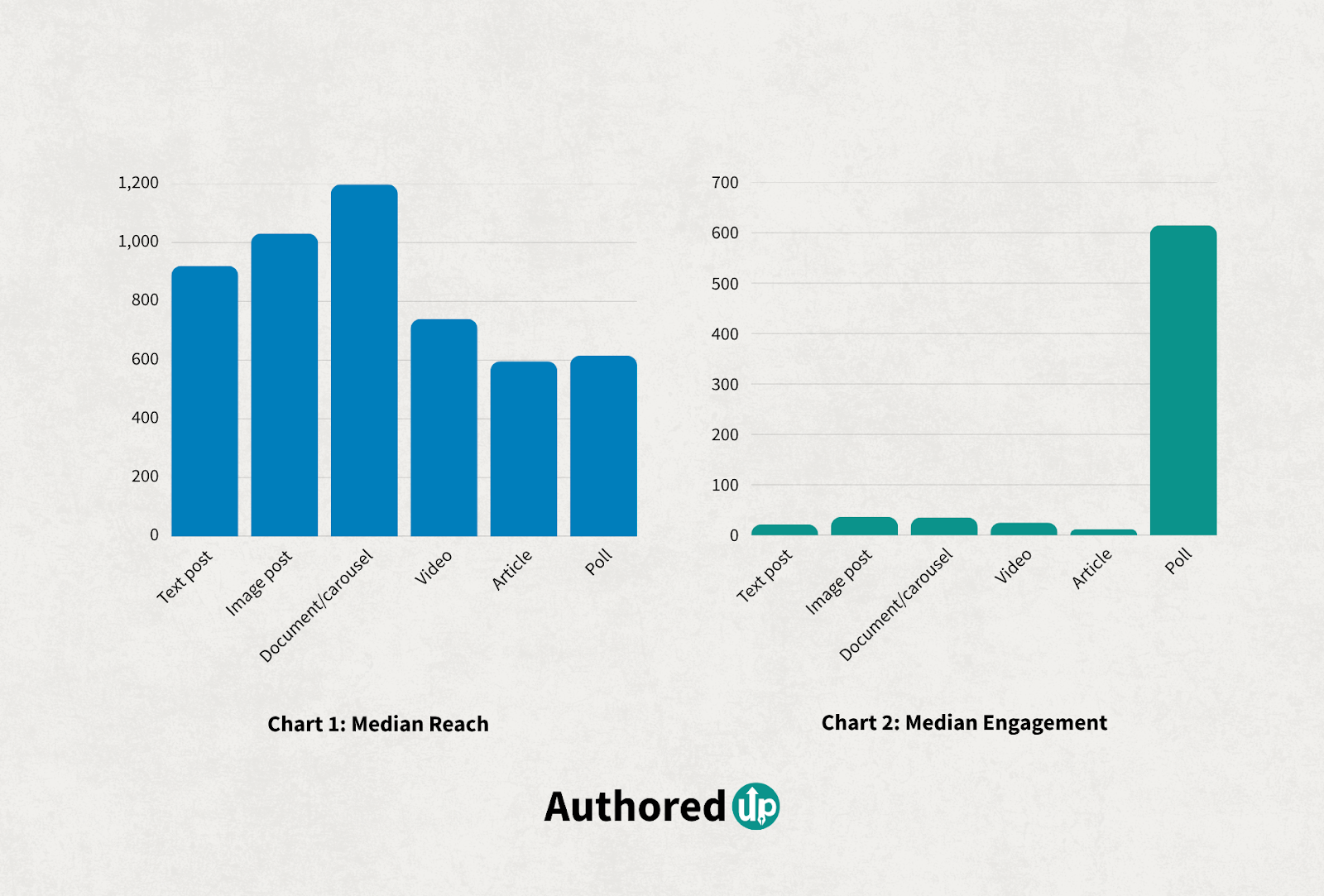
The reach multiplier tells the story. A reach multiplier of 1.0x means a format performs at the median across all formats. Articles sit at 0.69x, meaning they reach about 31% fewer people than the average post. Documents lead at 1.39x.
This isn't because articles are bad content. It's because they require a click-through. The feed rewards content people can consume without leaving. Articles add friction.
Year-over-year, articles are holding steady. Article reach dropped just 6% for all profiles, compared to a 36% drop for video and a 16% drop for images. Articles aren't growing, but they're not collapsing either. They serve a different function.
When to Use a LinkedIn Post
Posts should be your default. They make up the majority of LinkedIn content for a reason: they show directly in the feed, get immediate engagement, and the algorithm distributes them to your network without requiring a click.
Use a post when:
- You have a single insight, opinion, or story to share
- You want comments and reactions (posts have a much lower friction to engage)
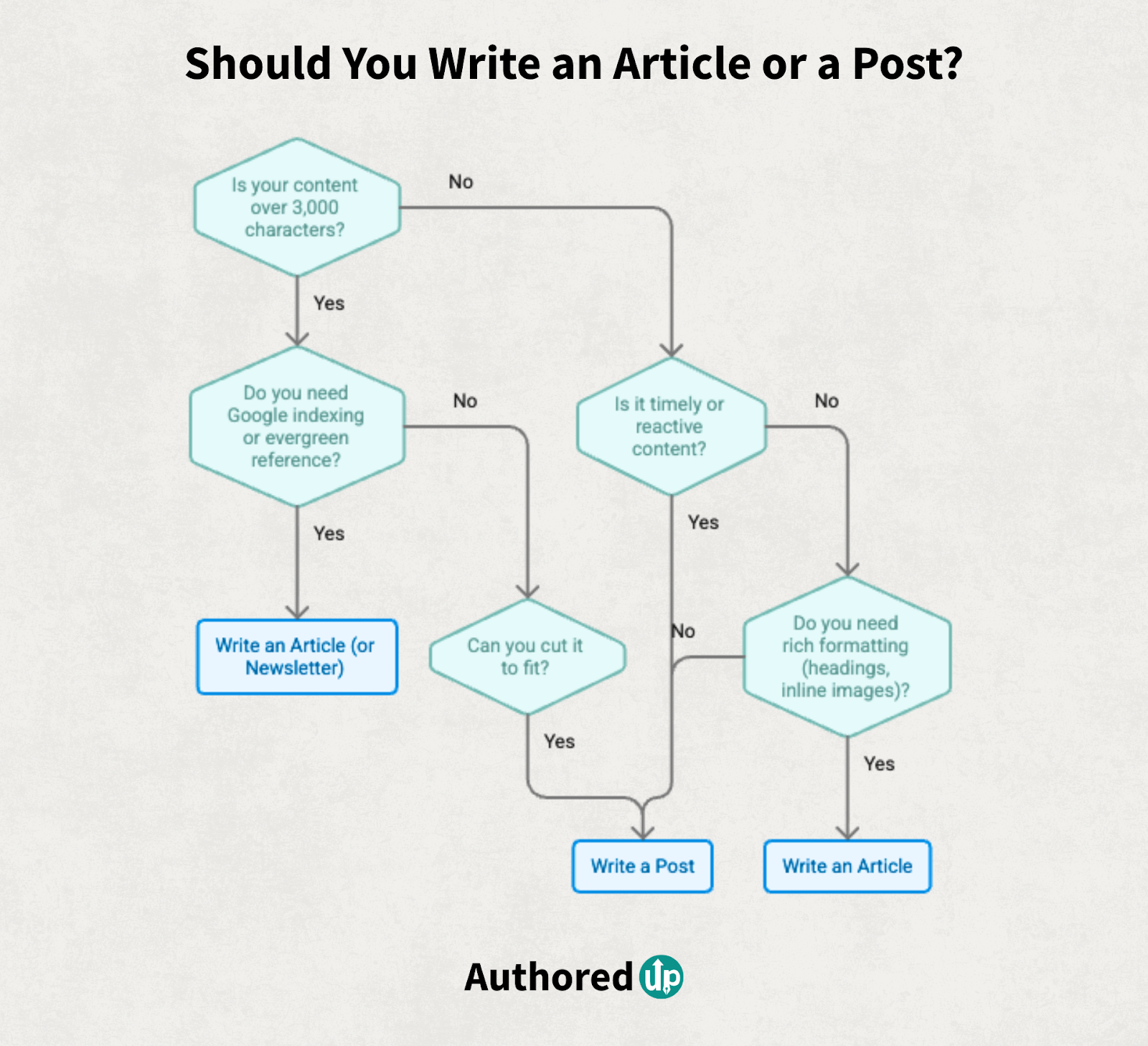
- Your content fits within 3,000 characters (roughly 400-500 words)
- You're posting daily or multiple times per week
- You want to share visual content: images, carousels, or video
- The content is timely: a reaction to news, a trending topic, a hot take
- You're telling a personal or professional story
Posts are feed-native. Your audience sees the full content without clicking anything. That's why posts dominate engagement: the barrier to reading and reacting is essentially zero.
LinkedIn's post formatting is limited by default, but you can add bold, italic, bullets, and special characters using unicode formatting. AuthoredUp's text formatter handles this so your posts stand out in a mostly plain-text feed.
When to Use a LinkedIn Article
Articles exist for content that posts can't contain. If your idea needs more than 3,000 characters, requires headings and inline images, or should be findable via Google search, an article is the right format.
Use an article when:
- Your content exceeds 3,000 characters and cutting it would weaken the argument
- You want Google to index your content (articles get their own URL and are crawlable)
- You're writing evergreen reference content: a guide, framework, or research piece
- You need rich formatting: headings, inline images, embedded videos, links
- You want the content to live permanently on your profile in the Articles section
- You're building a newsletter subscriber base (articles can be sent as newsletters)
- You're publishing something you want people to bookmark and come back to

The SEO angle is underrated. LinkedIn articles get indexed by Google. Posts generally don't. If you're writing about a topic people search for on Google, not just LinkedIn, an article gives your content a second distribution channel.
The trade-off is clear: articles sacrifice feed engagement for depth, formatting, permanence, and searchability.
What About LinkedIn Newsletters?
Newsletters are articles with a distribution layer on top. When you publish a newsletter edition, LinkedIn sends a push notification to all your subscribers.
This matters because it solves the article's biggest weakness: low feed visibility. Newsletter subscribers get notified. Regular articles rely on the feed algorithm, which deprioritizes link-click content.
Consider a newsletter if:
- You publish long-form content consistently (at least monthly)
- You want a direct notification channel to your audience
- You're building an email-like subscriber base on LinkedIn
- Your content is serial: a recurring analysis, industry roundup, or topic series
If you're just writing a one-off long-form piece, publish it as a standalone article. Newsletters require commitment to a cadence.
For inspiration, see our list of the best LinkedIn newsletters.
The Best Strategy: Use Both
Most creators should spend 80% of their effort on posts and 20% on articles. Here's why:
- Posts build your daily presence and feed engagement. They keep you visible.
- Articles build your long-term authority and search visibility. They keep you discoverable.
- The two formats reinforce each other: articles provide depth that posts tease, and posts provide frequency that articles can't match.
A practical content mix
Content Type
The key is not choosing one format over the other. It's knowing when each format serves you best.
Plan your content mix with a calendar. Knowing which days are for posts and which are for your monthly article prevents decision fatigue. See our guide on building a LinkedIn content calendar.
When is the best time to post?
Timing matters for both formats, but especially for posts where the first hour of engagement signals determine reach. Check our free Best Time to Post tool to find your optimal posting window.
How to Repurpose Between Formats
The best LinkedIn creators don't choose between articles and posts. They repurpose between them.
Article to posts: One article becomes 5-10 posts. Extract individual insights, statistics, or frameworks from the article and turn each into a standalone post throughout the week. Tease the full article in the comments.
Post to article: When a post performs exceptionally well (high comments, saves, reposts), that's a signal the topic deserves deeper treatment. Expand it into an article with more detail, data, and examples.
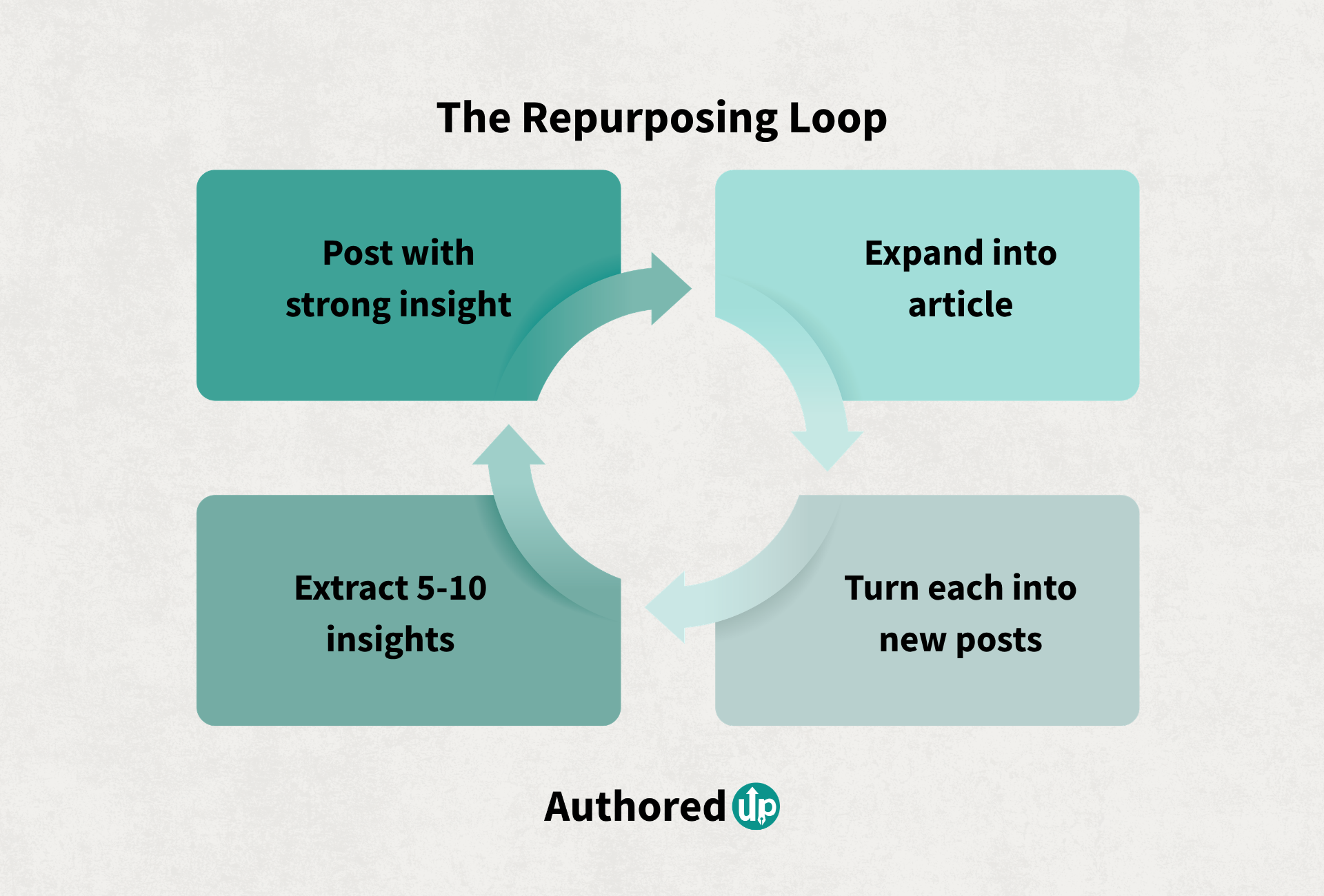
The repurposing loop:
- Write a post with a strong insight
- If it resonates (high engagement), expand into an article
- Extract 5-10 smaller insights from the article
- Turn each into a new post
- Repeat
Save your best post ideas and article outlines as drafts so you can build on them when you're ready. AuthoredUp's drafts feature lets you capture ideas quickly and come back to them later when you have time to write.
Frequently Asked Questions
Do LinkedIn articles get more engagement than posts?
No. Posts consistently outperform articles in engagement. Our data shows text posts get a median of 21 engagements versus 12 for articles. The gap is wider for image posts (36) and document/carousel posts (35). Articles sacrifice engagement for depth and Google searchability.
Are LinkedIn articles indexed by Google?
Yes. Each article gets its own URL that Google can crawl and index. This is one of the biggest advantages of articles over posts. If you're writing about a topic people search for on Google, an article gives your content visibility beyond the LinkedIn feed.
Can I format text in LinkedIn posts the same way as articles?
Not natively. Articles support headings, inline images, embeds, and rich formatting. Posts are limited to plain text with line breaks. However, you can add bold, italic, and special characters to posts using unicode formatting. It's not as flexible as article formatting, but it makes posts significantly more readable.
How long should a LinkedIn article be?
Aim for 1,500-3,000 words. Long enough to provide real depth and perform well in Google search, short enough to hold attention. Articles under 1,000 words often feel thin. Articles over 4,000 words test most readers' patience.
Should I post a link to my article in a regular post?
You can, but know that LinkedIn's algorithm deprioritizes posts with external links. Instead, write a native post that teases the article's key insight, then add the article link in the first comment. This gives your promotional post better feed distribution.
Are LinkedIn articles still worth writing in 2026?
Yes, for the right content. Articles make up 6% of all LinkedIn content from personal profiles. They won't match posts for reach or engagement, but they serve a distinct purpose: long-form authority building, Google search visibility, and permanent profile content. If you only write posts, you're missing the SEO and evergreen components of a complete LinkedIn strategy.
.svg)
.png)

.svg)
.png)
.png)